


Larridin
TL;DR
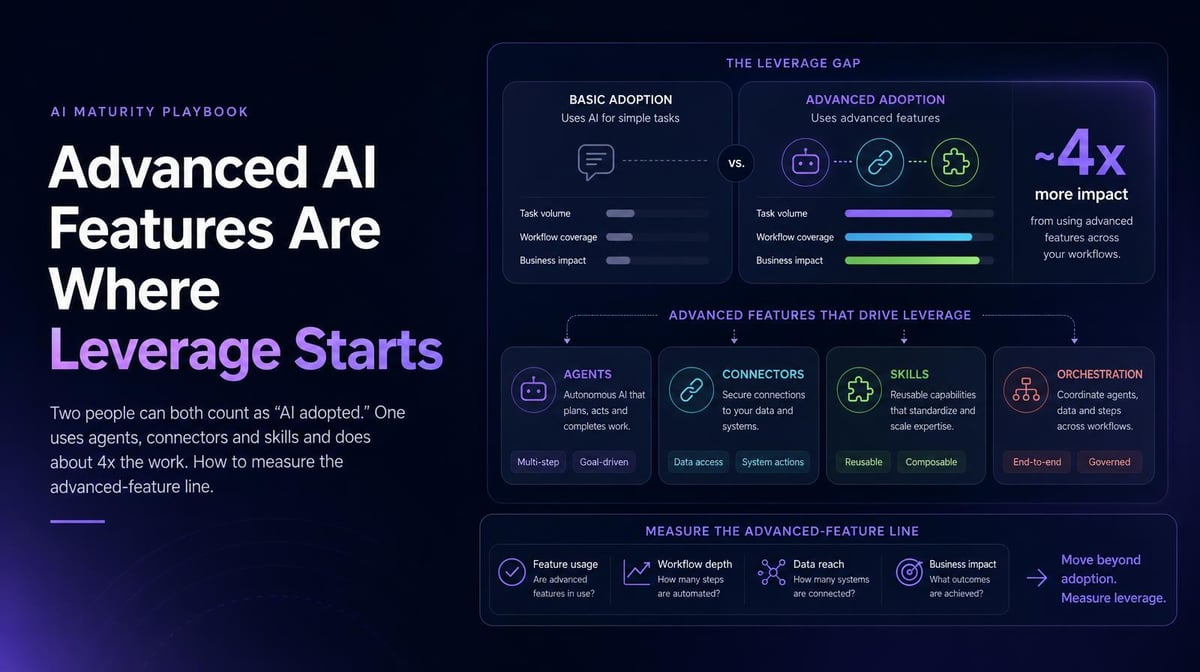
Short answer: Basic chat and advanced-feature use can look the same on an adoption dashboard, but they don't necessarily deliver the same AI leverage. Track how many AI users have adopted at least one advanced feature (connectors and MCP, coding agent sessions, skills, or plugins) and compare their output to everyone else’s. In one customer’s instance, advanced-feature users generated 4.3x the AI leverage.
Key wins:
- A clear line between using AI and using it well.
- Department-level gaps that a healthy org-wide number hides.
- An enablement target tied to output, not logins.
Who it’s for: CIOs, CHROs and CAIOs planning the next phase of AI enablement.
What’s a Spark Insight? Sparks are short, data-backed findings Larridin surfaces from how AI is actually used across an organization. This post expands on one of them.
Quick Answers
If you’re asking… | The answer |
|---|---|
What counts as an advanced AI feature? | Capabilities beyond chat: connectors and MCP integrations, coding agent sessions, skills and plugins. |
Does advanced use change output? | In one instance, users with at least one advanced feature generated 18.2 Agent FTE per 100 users vs. 4.2 for those without, a 4.3x gap. |
What share of users get there? | In that instance, 59.4% of AI users over 12 weeks. Department rates ranged from 100% to 13%. |
How do I raise it? | Connect AI to the systems people already work in, and teach one advanced feature per role tied to a real task. |
What We Hear From Leaders
- We’re at high adoption. Everyone’s using AI.
- Agents and connectors are for engineers. Most of our people just need chat.
The data raises the same question across functions: Are people using AI beyond basic chat?
What you struggle with | What you need | How Larridin helps |
|---|---|---|
Adoption counts treat all usage alike | A line between basic and advanced use | Advanced usage analytics track adoption of connectors, agents, skills and plugins |
Can’t tie advanced use to value | Output for adopters vs. non-adopters | Agent FTE per 100 users, split by advanced-feature adoption |
Healthy org numbers hide lagging teams | Department-level adoption rates | Department breakdowns from 0% to 100% |
The Data: A 4.3x Gap Behind One Checkbox
In one customer’s instance, over 12 weeks:
- 59.4% of AI users had adopted at least one advanced feature: connectors and MCP, coding agent sessions, skills, or plugins.
- In the latest week, the 19 adopters generated 18.2 Agent FTE per 100 users.
- The 13 non-adopters generated 4.2.
That’s a 4.3x gap in realized AI leverage, not just usage frequency. Department-level adoption of advanced features ranged from 100% (Product and Customer Experience) down to 13% in one segment. Averages can hide a similar gap in AI fluency scores.
Sample note: 32 users in one instance. Treat it as a pattern to test, not a benchmark.
Why Do Advanced Features Create More Leverage?
Basic chat often leaves someone to move the result into the next system. Advanced features can reduce those handoffs:
- Connectors and MCP can give AI access to data and, where permitted, actions in systems such as tickets, docs, CRM, and code.
- Coding agent sessions carry multi-step work through to a result.
- Skills package a proven way of doing a task so it can be reused.
- Plugins add capabilities a base assistant doesn’t have.
Together, these features can move AI beyond answering questions toward completing work. Agent FTE estimates AI-contributed capacity in full-time-equivalent terms.
Are Advanced Features Only for Engineers?
No. In the instance above, Product and Customer Experience were at 100% advanced-feature adoption. A CRM connector for sales or a support-desk connector for CX can be valuable to non-engineering teams, too.
How To Measure and Grow Advanced Feature Adoption
- Define the features that count as advanced in your stack.
- Measure the share of AI users who used at least one in the last 12 weeks by department.
- Compare output for adopters and non-adopters using Agent FTE or hours added.
- Pick one feature per role to broaden AI use cases, such as a CRM connector for sales or a support-desk connector for CX, and run a short enablement push.
- Re-measure in four weeks and expand what moved the output gap.
FAQ
What is MCP?
Model Context Protocol is an open standard for connecting AI assistants to external tools and data sources.
Does advanced-feature use cause higher output?
The data shows a strong association, but isn’t proof of cause. Heavier users may adopt advanced features first. Re-measuring after enablement helps separate the two.
Is there a security trade-off?
Connectors give AI access to more data, so pair rollout with access controls and governance risk review.
Spark a discussion that moves your AI strategy forward. [Get your first Sparks]