


Larridin
TL;DR
Short answer: Most shadow AI metrics weight tools by how much they’re used. Risk depends on what data each tool touches and how many people feed it. Score every unapproved tool on data sensitivity, reach, vendor review status, and activity type, then act on the top of that list, not the top of the usage chart.
Key wins:
- A list of unapproved tools ranked by real exposure.
- Targeted fixes (approve, replace, or block) instead of a blanket memo.
- A governance number you can defend to the board.
Who it’s for: CIOs, CISOs, and CAIOs who own AI governance.
What’s a Spark Insight? Sparks are short, data-backed findings Larridin surfaces from how AI is actually used across an organization. This post expands on one of them.
Quick Answers
If you’re asking… | The answer |
|---|---|
Is a low unapproved usage rate safe? | Not by itself. A tool with little activity can still send entire meetings or codebases to an unvetted vendor. |
How do I assess shadow AI risk? | Score each unapproved tool on data sensitivity, number of users, vendor review status, and what each event contains. |
Which tools are usually underweighted? | Meeting notetakers and coding agents. Even limited activity can expose sensitive conversations, files, or code. |
Why does it matter financially? | IBM found that organizations with high levels of shadow AI had breach costs averaging $670,000 more than those with little or none. |
What We Hear From Leaders
- Our shadow AI rate is 5%. It’s basically under control.
- Most unapproved tools barely get used.
Both can be true and still miss the biggest exposure on the list. Even executive teams can be part of the exposure.
What you struggle with | What you need | How Larridin helps |
|---|---|---|
One low percentage on the governance slide | Exposure by tool, not just share of events | AI Governance breaks unapproved usage down by tool, category, and department |
Dashboards sorted by DAU | Sorting by users, events, and category | Unapproved tools table sortable by DAU, users, and activity volume |
Desktop clients flagged as unapproved | To separate quirks from real shadow use | Platform-level view of approved vs. unapproved surfaces |
The Data: Small Rate, Big Exposure
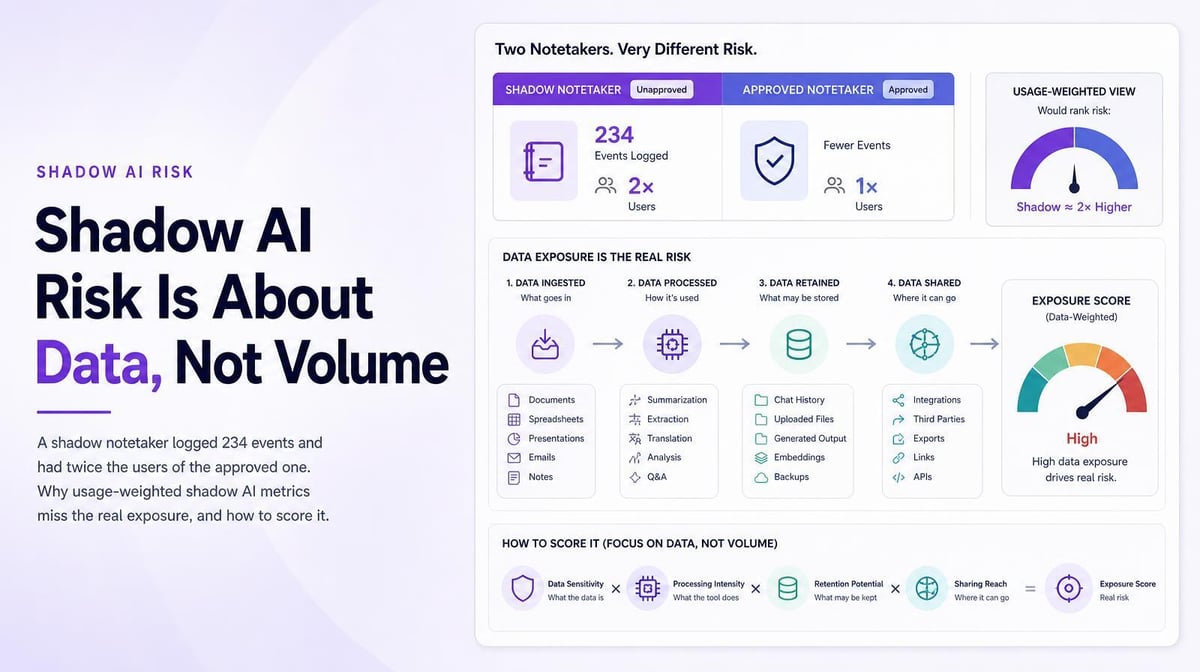
In one customer’s instance, the Unapproved AI Tool Usage Rate was 5.7% over four weeks. The tools inside that number changed the picture:
- The top browser-based unapproved tool was a meeting notetaker with 14 active users.
- The approved notetaker in the same org had 7. The shadow tool had twice the reach.
- Two other meeting notetakers also showed up as unapproved in that organization.
- The unapproved notetaker logged 234 active events, against more than 14,000 for the top approved tool.
By event count, notetakers look like a rounding error. But those counts don't tell you what data a tool accesses. A single recorded meeting could contain an entire customer conversation or pipeline review.
A second instance showed the same trap with coding tools. Sorted by DAU, a notetaker led the unapproved list with 17 users and 621 events. Sorted by activity, a desktop coding agent jumped to the top: 5 users, 1,463 events. Five people generated the largest block of unapproved activity in the company.
Why Do Usage-Weighted Metrics Miss the Risk?
An unapproved usage rate divides unapproved events by all AI events. Chat tools generate thousands of small events. Event counts don't reveal the volume or sensitivity of data involved. A notetaker may record an entire meeting, and a coding agent may access substantial repository context.
The stakes are real. In IBM’s 2025 Cost of a Data Breach Report, one in five organizations reported a breach due to shadow AI. Shadow AI incidents compromised personally identifiable information (PII) in 65% of incidents against a 53% average, and only 37% of organizations had policies to manage or detect it.
How Do I Score Unapproved AI Tools?
To prioritize reviews, rate each tool from 1 to 3 on four risk factors, then multiply the scores.
This 1–3 scoring model is an editorial triage framework, not a Larridin product score or a quantified probability of a breach.
Factor | 1 (low) | 3 (high) |
|---|---|---|
Data sensitivity | Public or generic text | Customer calls, code, financials, regulated data |
Reach | One or two users | A team or department |
Vendor status | Reviewed, pending contract | Never reviewed |
Event payload | Short prompts | Full recordings, files or repo context |
A notetaker on sales calls scores near the top even with low activity. A desktop client of an approved tool may be misclassified as unapproved. Confirm its approval status and access before assigning a risk score.
How To Run a Shadow AI Risk Assessment
- Pull every unapproved tool with users, events, category, and department.
- Remove classification quirks, such as desktop clients of approved tools, after checking them.
- Score the rest on the four factors above.
- Act on the top five: approve with a contract, replace with an approved alternative, or block. Use appropriate AI monitoring tools to support enforcement.
- Re-score monthly and report the count of high-risk tools, not just the usage rate.
FAQ
What is a shadow AI risk assessment?
A review that ranks unapproved AI tools by the exposure they create, based on data, users, and vendor status.
Are meeting notetakers really a shadow AI risk?
Yes. Each recording can contain customer, pricing, or internal planning data sent to an unvetted vendor.
Should we block every unapproved tool?
Usually not. Heavy use of a shadow tool often signals a gap the approved stack doesn’t cover. Replace or approve where you can.
Spark a discussion that moves your AI strategy forward. [Get your first Sparks]
Sources
- IBM Report: 13% of Organizations Reported Breaches of AI Models or Applications, IBM press release, July 30, 2025.