
Enterprise AI Measurement Guide
Workflow Intelligence
Project Teams Table
Which project teams have the highest friction burden and greatest Potential Savings in the Workflow Intelligence tab?
What it shows
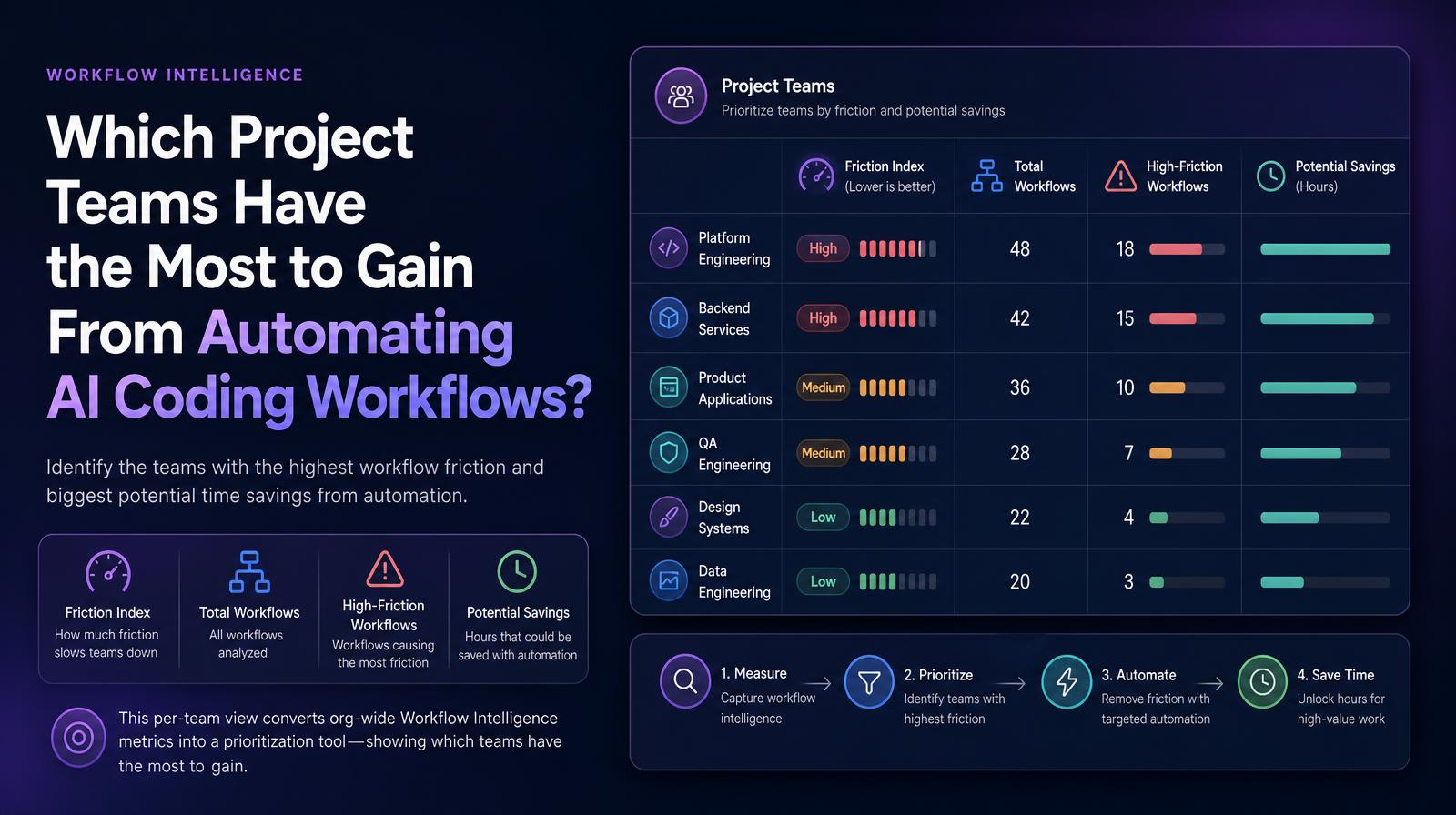
The Project Teams table shows four workflow intelligence metrics for each project team: their Friction Index score, total workflow count, number of those workflows classified as high-friction, and quantified Potential Savings in hours. This per-team view converts the org-wide Workflow Intelligence metrics into a prioritization tool, showing which teams have the most automation opportunity, the highest friction burden, and the largest gap between workflow volume and workflow quality.
Why it matters
The Project Teams table is where the Workflow Intelligence overview becomes actionable. A high org-level Friction Index might reflect one team with acute friction problems or dozens of teams with moderate ones, two scenarios that require different responses. The table surfaces both the severity (Friction Index per team) and the opportunity (Potential Savings per team), making it possible to prioritize automation investment based on aggregate return rather than loudest complaint. COOs and CIOs use this table to build the workflow automation roadmap, not just to report that friction exists.
The Larridin angle
The combination of High-Friction Workflows count and Potential Savings per team in the same row prevents the common prioritization error of focusing on the team with the most high-friction workflows rather than the team with the most savings potential. Larridin customer data documents teams with fewer high-friction workflows but larger savings than teams with more flagged workflows, because workflow volume determines savings more than workflow count alone.
Related Workflow Intelligence Metrics
Common questions
What does the Friction Index score indicate in the Project Teams table?
The Friction Index score indicates the level of workflow friction each project team experiences, helping to identify where automation could reduce inefficiencies.
How can the Project Teams table help prioritize automation investments?
The table helps prioritize automation investments by showing the Friction Index and Potential Savings per team, allowing for decisions based on potential return rather than just workflow count.
Why is it important to consider both High-Friction Workflows and Potential Savings?
Considering both metrics prevents prioritization errors by highlighting teams with fewer high-friction workflows but greater savings potential, emphasizing the impact of workflow volume.
How do COOs and CIOs use the Project Teams table in decision-making?
COOs and CIOs use the table to build a workflow automation roadmap, focusing on aggregate return and addressing the most significant friction issues across teams.