
Enterprise AI Measurement Guide
Desktop Analytics
AI Tool Insights Table
Which desktop AI tools are being used, what is each tool's authorization and category, and how do their activity levels compare?
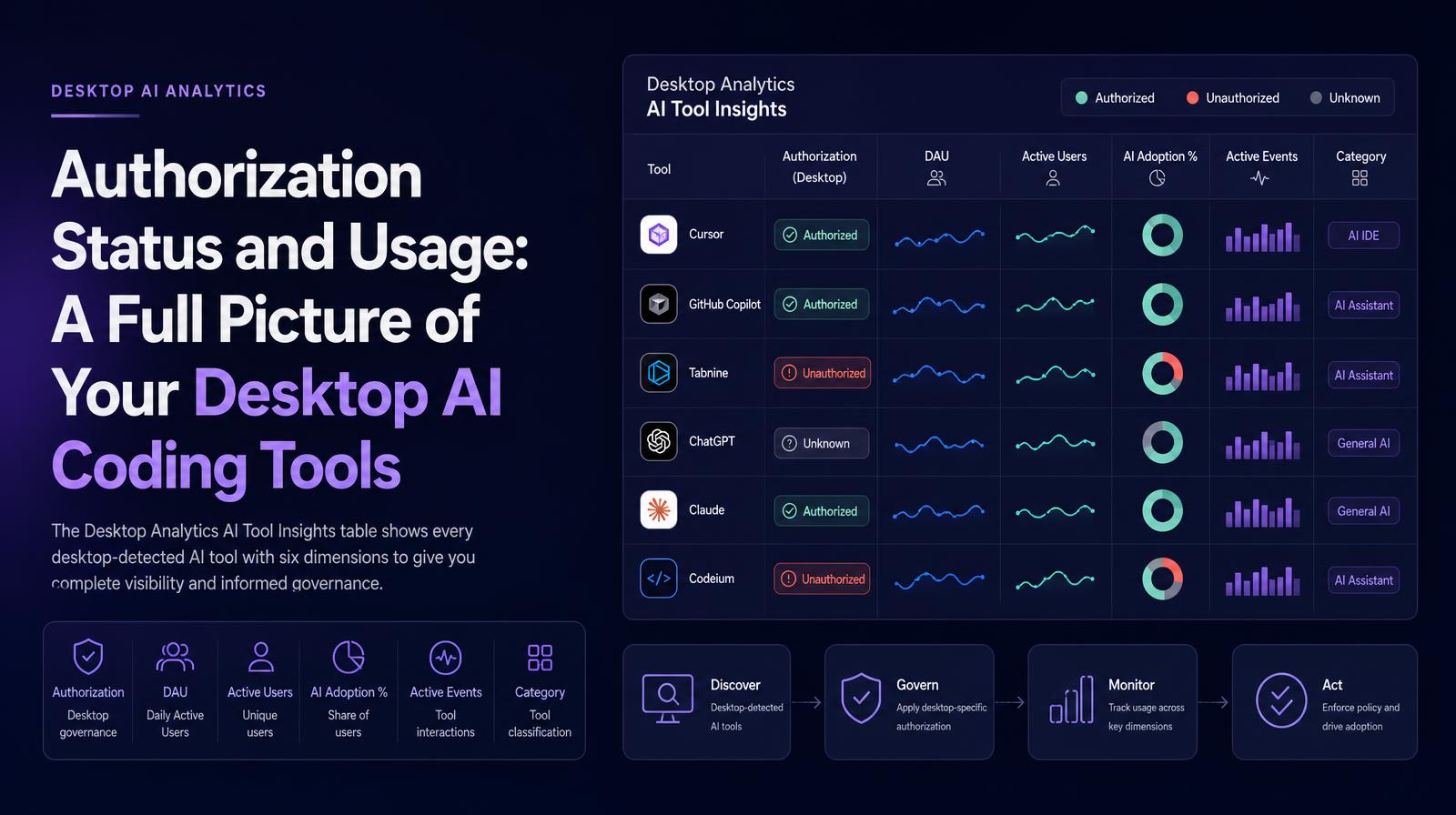
What it shows
The Desktop Analytics AI Tool Insights table shows every desktop-detected AI tool with six dimensions: Authorization (the desktop-specific governance status, whether the tool is authorized, unauthorized, or unknown), DAU, Active Users, AI Adoption %, Active Events, and Category. The Authorization column is desktop-specific, reflecting the distinct governance layer that applies to locally installed tools versus browser-accessed ones.
Why it matters
Desktop tools require local installation, which means an unauthorized desktop AI tool has been actively installed by an engineer on their device, a more deliberate action than accessing an unauthorized browser tool via URL. The Authorization column in the desktop table therefore represents a more acute governance concern than equivalent browser tool status: an unauthorized desktop AI coding agent with high DAU is an actively deployed, widely used tool that was installed outside IT oversight. That is the scenario CISOs most need visibility into for both security and compliance purposes.
The Larridin angle
The Active Events column at the desktop tool level is the dimension that most clearly separates high-risk from low-risk unauthorized desktop tools. An unauthorized desktop tool with 2 Active Users and 12 events is a different risk profile from one with 5 Active Users and 2,800 events, the second is operating at the intensity level of an actively embedded workflow tool, not a casual install. Larridin's events data makes that distinction immediately visible, enabling proportionate governance response rather than blanket policy application.
Related Desktop Analytics Metrics
Common questions
What does the Authorization status indicate in the AI Tool Insights table?
The Authorization status in the AI Tool Insights table indicates whether a desktop AI tool is authorized, unauthorized, or unknown, reflecting the governance status specific to locally installed tools.
Why is the Authorization status of desktop AI tools important for the C-suite?
For the C-suite, the Authorization status is crucial because unauthorized desktop tools represent a governance concern, as they are actively installed outside IT oversight, posing potential security and compliance risks.
How does Larridin differentiate between high-risk and low-risk unauthorized desktop tools?
Larridin uses the Active Events column to differentiate risk levels, where a tool with high active events and users indicates a more embedded workflow tool, requiring a proportionate governance response.
What information does the AI Tool Insights table provide about desktop AI tools?
The AI Tool Insights table provides details on authorization status, daily active users, active users, AI adoption percentage, active events, and category for each desktop-detected AI tool.