

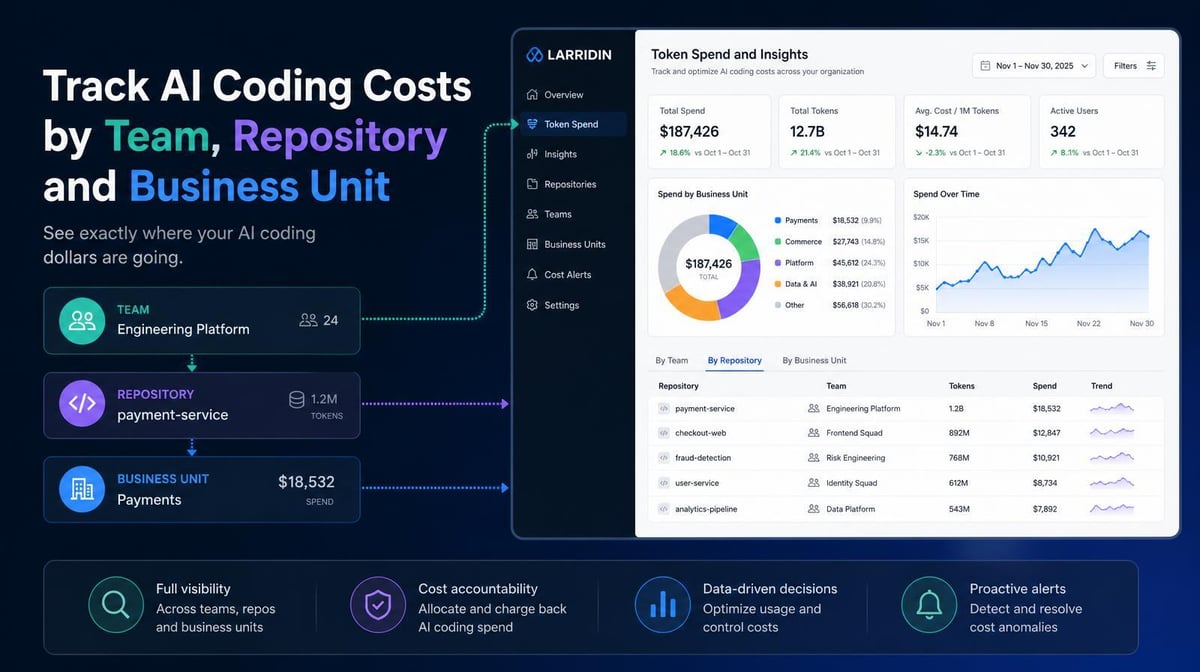

Cursor, GitHub, and Claude now provide more granular usage and spend data. The harder problem is combining those views and connecting costs to teams, repositories, business units, and delivery outcomes. Build that cost map first, then use it to reduce waste without restricting the work that ships.
Key Takeaways
- The State of FinOps 2026 found that 98% of FinOps practitioners now manage AI spend, up from 31% two years earlier. AI cost management has become a core FinOps responsibility.
- Cursor Enterprise organizations now roll up spend and token usage across teams and support chargebacks by business unit or cost center. Native visibility is improving, but it still covers only one vendor’s ecosystem.
- Governing AI coding spend across an enterprise requires a shared attribution layer that maps users to teams, normalizes costs across tools, associates usage with repositories, and connects spend to delivery and quality outcomes.
Why Native Dashboards Still Leave an Attribution Gap
AI coding vendors have expanded their administrative reporting.
Cursor Enterprise organizations let administrators view spend and token usage across teams, filter by user or service account, and support chargebacks by business unit or cost center.
GitHub Copilot usage metrics include enterprise-, organization-, repository-, and user-level reports. GitHub also documents how administrators can construct team-level metrics by joining user-team data with per-user usage reports.
Claude Code analytics provide adoption, contribution, and spend data, including pull requests and lines of code associated with Claude Code when the GitHub integration is enabled.
Those dashboards answer useful questions inside each product. They don’t create one consistent view across Cursor, Copilot, Claude Code, agents, and other tools in the engineering stack. Finance may still need to reconcile different billing structures, user identities, reporting periods, and attribution methods before it can compare teams or allocate costs.
The bigger gap is shared business context. Vendor dashboards may show where usage occurred inside a product, but they don’t create a consistent cross-tool view of which business unit owns the work or whether higher spend improved delivery and quality.
4 Layers of AI Coding Spend Attribution
1. Map Users to Teams and Business Units
Vendor reports often identify activity by account or email address. Financial reporting needs those identities connected to the organization’s current team and business-unit structure.
Create a consistent mapping between developer accounts, engineering teams, cost centers, and business units. Update it as employees move, teams reorganize, or contractors join and leave.
Larridin’s Token Spend & Insights provides a cross-tool view of AI costs by team and workflow, giving finance and engineering a shared starting point for allocation.
2. Normalize Costs Across the Tool Stack
AI coding tools use different pricing structures. Costs may include seats, shared usage pools, AI credits, token consumption, on-demand overages, or separately billed agents and code reviews.
Normalize those charges into a consistent reporting period and assign shared costs using an agreed method. The goal is to prevent the differences between vendors from producing an incomplete or misleading total.
This also exposes overlapping subscriptions and usage that may be billed through cloud providers or model APIs rather than the coding tool itself.
3. Associate Spend With Repositories and Workflows
Team attribution shows who generated the cost. Repository and workflow attribution show where the activity occurred.
Connect AI usage data with source-control, project-management, and continuous integration and delivery systems. That lets leaders distinguish spending on customer-facing products and critical systems from experimentation, internal tooling, maintenance, or deprecated codebases.
Repository attribution also makes comparisons more meaningful. Two teams may spend the same amount while working on codebases with very different complexity, risk, and business value.
4. Connect Cost to Delivery and Quality Outcomes
Cost allocation isn’t ROI measurement until the spending is connected to what the team delivered.
Look at team and repository spend alongside pull request throughput, lead time, deployment frequency, change failure rate, incidents, rework, and code turnover. Larridin’s AI Dev Productivity platform connects AI contribution and cost data with delivery and quality signals.
That distinction keeps leaders from treating either high or low spending as automatically good. A high-spend team may be generating disproportionate value. A low-spend team may have low adoption, or it may simply have less need for the tool.
What Team-Level Attribution Enables
Once the data is connected, leaders can have three more useful conversations:
- Budget ownership: Assign showback or chargeback to the teams and business units generating the spend.
- Evidence-based rationalization: Compare high- and low-spend teams with their delivery and quality outcomes before changing seats, limits, or tools.
- In-period cost control: Use projected spend and alerts to address unusual consumption before the billing period closes.
The objective is to make the relationship between cost, activity, and value visible enough to manage cost effectively.
Use the Team Cost Map to Reduce Waste Without Slowing Delivery
Once you can attribute AI coding costs to teams, repositories, and workflows, you can decide where to intervene. Blanket caps treat productive power users and wasteful usage the same. Use the cost map to identify the owner, the work, and the outcome before changing access.
The seat price buys access; it does not set the ceiling. A completion, a long agent run, a premium model, and an automated code review can generate different costs behind the same account. GitHub Copilot’s usage-based billing, Cursor’s included and on-demand usage, and Claude Code’s model and context costs all need to be assigned to the team generating the work.
1. Right-Size Seats and Budgets Within Each Team
Start with each team’s actual adoption and usage patterns, then inspect the users and workflows behind the total. Separate inactive access, occasional use, and tools embedded in daily delivery. Remove unused seats before constraining active developers.
Cursor’s June 2026 Teams pricing guidance describes mixing Standard and Premium seats according to usage. GitHub’s budget-control guidance recommends a default user budget with individual overrides for legitimate power-user or large-codebase work. Apply those choices within the team’s allocation rather than giving every developer identical capacity.
Use Larridin’s AI Adoption dashboard to distinguish unused access from daily workflows. Review capacity with the team owner and check delivery and quality before tightening limits.
2. Compare Model Choices by Team, Repository, and Task
A team working on complex architecture may need a different model mix from a team handling repeatable maintenance. Compare model costs within similar tasks and repositories before changing defaults across the organization.
Anthropic’s Claude Code cost guidance recommends Sonnet for most coding tasks, Opus for complex architecture or multi-step reasoning, and Haiku for simple subagent work. Use the lowest-cost model that consistently meets the task’s quality and risk requirements.
Test repeatable work first. Compare review time, rework, failures, and delivery alongside model spend so a lower token price does not become a higher operational cost. Larridin’s model tier routing framework explains how task-level cost and quality data support that decision.
3. Assign Agent and Context Overhead to an Accountable Team
Long sessions, unnecessary context, and idle agents can consume tokens without improving the result. Map service accounts and recurring agent jobs to an owning team, repository, and workflow. Shared infrastructure still needs an agreed allocation method and someone responsible for investigating changes.
Claude Code’s cost guidance recommends clearing stale context between unrelated tasks, disabling unused Model Context Protocol (MCP) servers, filtering verbose logs, and moving specialized instructions into on-demand skills. For agent teams, keep the team small and shut down teammates when their work is complete.
Have each workflow owner review recurring jobs, stop sessions when work ends, and limit context to what the task requires. Larridin’s agent cost governance framework provides additional context for ownership and in-period monitoring.
4. Rationalize Overlapping Tools Team by Team
Using Cursor, Copilot, Claude Code, model APIs, cloud agents, and code-review tools together may serve legitimate needs. The cost map should show which teams use each capability and why, rather than treating every overlap as waste.
Inventory seats, consumption, agents, code-review charges, and model usage across the stack. Ask each team which capability a tool uniquely provides, whether adoption justifies access, and whether the workflow produces durable work. Remove inactive seats, consolidate redundant capabilities, or narrow access to the teams that need it.
5. Investigate Concentrated Spend Against Team Outcomes
High spend is not automatically waste, and low spend is not automatically efficiency. In one Larridin customer’s engineering organization, one engineer generated roughly 65% of one week’s AI tool spend. That customer example is a reason to investigate the output, not a benchmark for what every team should spend.
Trace a spending spike from business unit to team, user or service account, repository, and workflow. Compare the cost with pull request throughput, lead time, change failure rate, incidents, rework, and code turnover. Distinguish high-value delivery and owned experimentation from activity that never ships or creates disproportionate remediation.
Protect productive power users, high-value agentic workflows, model capacity needed for complex work, security and code-review controls, and time-boxed experiments with a clear owner and learning objective. Judge the intervention by cost per durable outcome, not only by whether the next invoice is smaller.
Frequently Asked Questions
Do AI coding tool dashboards support team-level spend tracking?
Some now do. Cursor Enterprise organizations provide team-level spend views and support chargebacks, while GitHub and Claude provide increasingly granular usage and contribution data. The remaining gap is consistent attribution across vendors, repositories, business units, and outcomes.
How do we allocate AI coding costs across business units?
Map user accounts to teams and business units, normalize seat and consumption charges across vendors, and aggregate the costs using an agreed allocation method. Keep the underlying user- and workflow-level data available so finance and engineering can investigate changes.
What should we do when AI coding spend is highly concentrated in one team?
Compare the concentration with delivery, quality, and business-priority data. Concentrated spending may indicate productive power users or a high-value agentic workflow. It may also reveal uncontrolled usage or activity that isn’t producing durable output.
How often should we review team-level AI coding spend?
Review allocation and outcomes at least monthly, but use in-period alerts for unexpected usage or projected overages. Monthly reporting explains what happened. Ongoing monitoring provides time to act before the invoice closes.
Does repository-level spend prove that an AI tool is creating value?
No. It shows where the cost is associated. Leaders still need delivery and quality data to determine whether that spending improved throughput, lead time, stability, or another business-relevant outcome.
Should Every Team Have the Same AI Coding Budget?
No. Use a consistent allocation method, then set capacity according to adoption, workload, repository complexity, and business priorities. Default user budgets can contain uncontrolled consumption, while targeted overrides protect legitimate power users. Review delivery and quality before changing limits.
What Is the Fastest Way to Reduce Waste Once Costs Are Mapped?
Remove inactive seats, enable in-period alerts, and investigate agent workflows with no accountable owner or durable output. Review model choice, context overhead, and redundant capabilities within the teams generating those charges before imposing broader caps.
Does a Cheaper Model Always Lower a Team’s Total Cost?
No. Evaluate model changes against review time, rework, failures, and delivery on comparable tasks. A lower token price can create additional operational cost if the output requires more correction or falls short of the task’s risk requirements.
Build the Attribution Your Finance Team Needs
Larridin connects AI coding spend across tools with team, workflow, repository, delivery, and quality context. That gives finance and engineering a shared view of where AI costs are generated and what the organization receives in return.
Book a discovery call to build your AI coding cost attribution.