


TL;DR
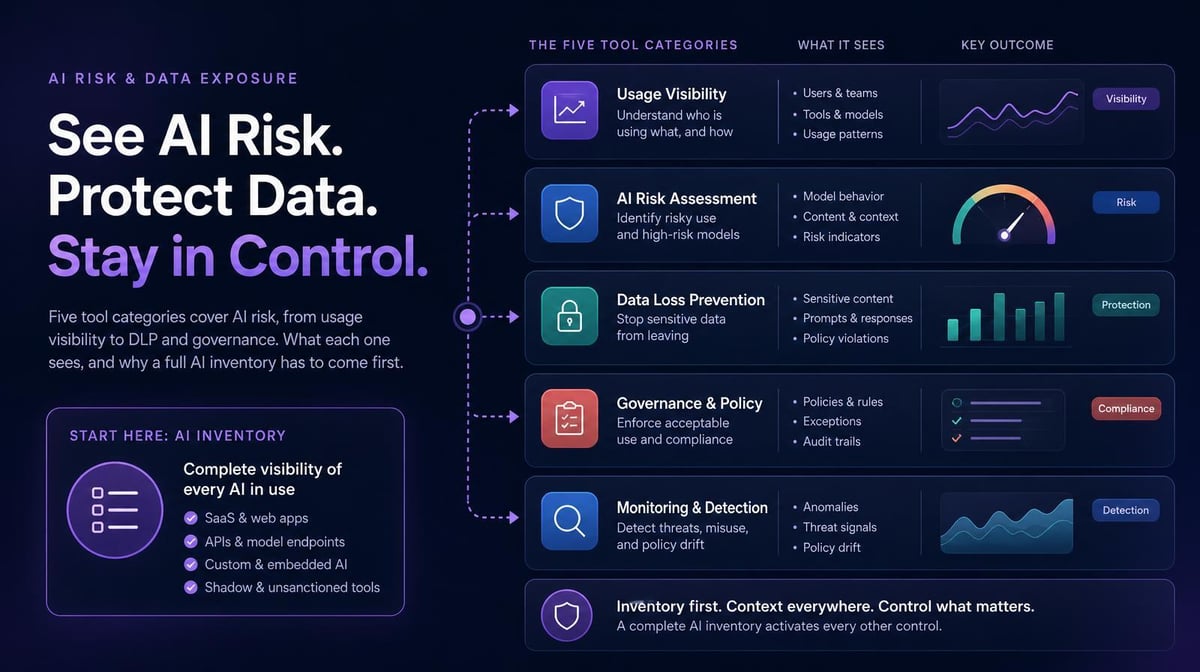
Five tool categories monitor risky use of enterprise AI assistants: AI usage visibility, data loss prevention, secure web gateways and CASB, vendor admin and compliance logs, and AI governance tooling. No single category covers everything. Start with visibility because you can’t write or enforce policy for AI tools you don’t know exist. IBM reported that 97% of organizations experiencing breaches of AI models or applications lacked proper AI access controls.
Quick Answers
If you’re asking… | Short answer |
|---|---|
What tools help monitor inappropriate or risky use of enterprise AI assistants? | A combination of AI usage visibility, data loss prevention, secure gateways, vendor compliance logs, and governance tooling. Start with visibility. |
Which platform shows us AI tool usage by department and role? | An AI usage visibility platform mapped to your org chart. Larridin shows every AI tool in use by team, role, and location, including personal accounts. |
What counts as risky AI use? | Sensitive data entered into unapproved tools, personal accounts used for company work, and unsanctioned agents with broad system access. |
Should we block AI tools outright? | Block the clearly unsafe ones and guide the rest. Blanket bans tend to push usage onto personal devices outside corporate visibility. |
What Counts as Inappropriate or Risky AI Use?
Risky AI use is any use that exposes sensitive data, bypasses policy, or performs actions without a clear audit trail.
The patterns security and compliance teams flag most:
- Customer data, source code, or financials pasted into unapproved AI tools
- Personal AI accounts used for work, outside enterprise data protections
- Unsanctioned agents or plugins granted access to email, files, or code
- AI output used in regulated decisions without review
- Credentials or access tokens shared with AI assistants
The cost is measurable. In IBM’s 2025 Cost of a Data Breach research, breaches involving high levels of shadow AI cost an average of $670,000 more, and 63% of breached organizations had no AI governance policy or were still developing one.
Which Tool Categories Monitor Risky AI Use?
These five categories address different layers of AI risk and can work together.
Category | What it does | Best for |
|---|---|---|
AI usage visibility | Inventories every AI tool in use by person, team, and role, including personal accounts | Knowing what exists and who uses it |
Data loss prevention | Inspects content for sensitive data and can block uploads | Stopping specific data from leaving |
Secure web gateway, CASB or SSE | Allows or denies access to web apps by policy | Enforcing access rules at the network or cloud edge |
Vendor admin and compliance logs | Records activity inside sanctioned enterprise AI products | Auditing use within approved tools |
AI governance tooling | Holds policies, inventories, and evidence for frameworks such as ISO/IEC 42001 | Satisfying auditors and regulators |
Larridin is in the first category. The browser extension and desktop app detect approved and unapproved AI tools, distinguish personal from enterprise use, and report by department and role.
Where Should You Start?
Start with a complete inventory of AI in use because every other control depends on knowing what to control.
DLP and gateway policies depend on knowing which apps and destinations employees use. Without an accurate inventory, organizations risk governing approved tools while missing unapproved ones. Continuously updated device-level data helps security teams close that gap.
How Do You Monitor AI Use Without Becoming the AI Police?
Guide behavior first and reserve blocking for clear violations, so employees keep using AI in the open.
When a team relies on an unapproved tool, that’s a signal about unmet needs. Steer them to an approved alternative that does the same job, tell them why, and track whether the switch sticks. Larridin’s guardrails are built for this: governance teams track usage and set policies aimed at guiding behavior instead of punishing people.
How Does AI Monitoring Support Compliance?
Continuous AI monitoring can supply inventory, usage records, and audit evidence that support an AI management system aligned with frameworks such as ISO/IEC 42001.
Larridin aligns with ISO/IEC 42001 through three capabilities: a continuously updated AI inventory including shadow AI, ongoing usage monitoring, and persistent records with exports auditors can verify. The platform supports SOC 2, HIPAA, and GDPR compliance requirements.
For security and compliance documentation, see the Larridin Trust Center.
Where AI Risk Monitoring Breaks, and How to Fix It
What you’re dealing with | What you need | How Larridin helps |
|---|---|---|
Policy covers approved tools only | Inventory of every AI tool in use | Detects approved and unapproved AI across the workforce |
Can’t tell personal from enterprise accounts | Account-level visibility | Tracks personal versus enterprise AI use |
Blocking drives AI use underground | Guardrails that guide behavior | Policy guardrails designed to steer behavior |
Auditors want proof of monitoring | Persistent, exportable records | ISO/IEC 42001-aligned audit evidence |
Key Takeaways
- 5 tool categories address different layers of AI risk and can work together.
- Start with a full inventory of AI tools in use.
- Guide employees to approved tools before blocking.
- Continuous monitoring doubles as compliance evidence.
FAQs
Do AI monitoring tools read prompt content?
It depends on the category. DLP tools inspect content by design. Larridin processes most sensitive data in the browser and sends only summary statistics to the cloud.
How should we handle personal AI accounts used for work?
Measure how common they are first, then offer an approved enterprise alternative and set a clear policy with a date.
Do AI agents need different monitoring?
Yes. Agents act with whatever access they’re given, so identity, access controls and audit logs matter more than for chat assistants.
How quickly can we get an AI inventory?
An initial inventory can begin taking shape as centrally managed devices are enrolled, but completeness depends on deployment coverage.
Sources
- IBM Cost of a Data Breach 2025 press release
- Larridin FAQ: detection, personal versus enterprise usage, ISO/IEC 42001, compliance