


TL;DR
AI coding spend can spiral when pricing is usage-based and there's poor cost oversight: agents run long jobs, premium models become the default, and idle seats renew automatically. Seven controls bring it back: one attributed ledger, team budgets with alerts, model defaults, agent run limits, seat hygiene, renewal reviews based on cost per outcome, and a named owner for every budget. Good controls cut waste and leave productive work alone.
Quick Answers
If you’re asking… | Short answer |
|---|---|
How do I stop my engineering team’s AI coding tool spend from spiraling out of control? | Attribute spend weekly, set team budgets with staged alerts, default routine work to cheaper models, cap agent runs and reclaim idle seats. |
How do we track spending on multiple AI tools company-wide? | Combine every vendor’s seat, usage, and token data in one ledger mapped to your org. Larridin does this across coding tools and the rest of your AI stack. |
Why does AI coding spend spike without warning? | Usage pricing on agentic work means a few heavy users or one runaway CI job can outspend a whole team’s seats. |
Should we cut tools to control spend? | Cut waste first. Compare cost per durable outcome by tool before removing any of them. |
Why Does AI Coding Tool Spend Spiral?
AI coding spend spirals because pricing has shifted toward usage-based charges, but budgets and ownership haven't kept pace.
A year ago most teams paid a flat seat fee for autocomplete. Now agents plan, edit, and test across whole repositories, and every step burns tokens. Premium models are a dropdown away. Meanwhile, teams add a second and third coding tool without retiring the first, so seat costs stack on top of usage costs.
The bill grows because no one person can see the full cost, and the people generating it never see a number.
What Controls Stop AI Coding Spend from Spiraling?
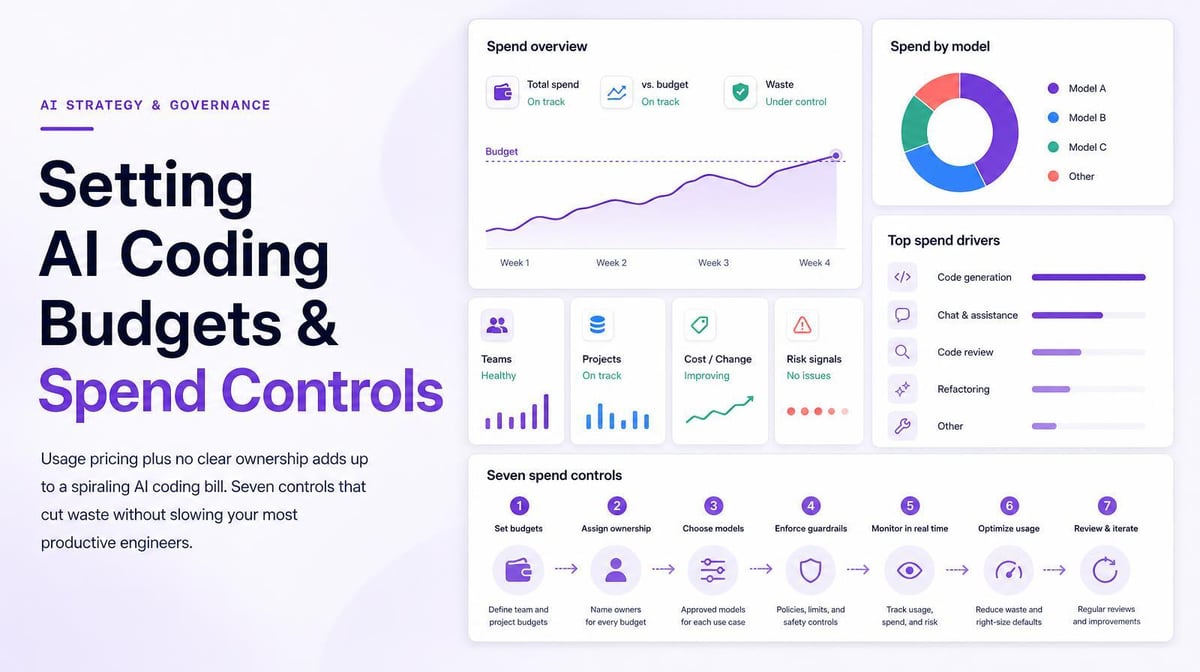
Together, these seven controls address the most common causes of runaway AI coding spend.
- One attributed ledger. Pull every tool’s spend into one view by team and developer, refreshed at least weekly.
- Team budgets with alerts. Give each team a monthly AI budget and alert the team lead at staged thresholds, such as 50%, 80% and 100%.
- Model defaults. Route routine tasks to a standard model and make premium models an explicit choice for work that needs them.
- Agent run limits. Cap tokens or wall-clock time per agent task, and alert on CI jobs that loop.
- Seat hygiene. Reclaim or reassign seats with no activity over a set window, such as 30 days.
- Outcome-based renewals. Review each tool before renewal on cost per durable outcome. Popularity alone shouldn’t decide a renewal.
- An owner. Every budget line needs one person who answers for it each month.
Per-developer limits are a further step for teams with wide usage swings. We cover how to set them in our post on per-developer AI coding budgets.
Where Should Spend Controls Live?
Enforcement belongs in each vendor’s admin console, and visibility belongs in a measurement layer that sees across all of them.
Some AI coding vendors offer organization- or user-level spend limits, usage caps, or model restrictions. Check what each plan and contract supports. Those limits work tool by tool, though, and none of them can tell you whether a team’s total AI spend across four tools is worth what it produces.
Larridin provides a unified view of AI usage and spending across vendors. It shows spend by team and developer across tools, flags unused license capacity, and tracks cost per durable outcome, so you know where to set limits and whether they’re working.
How Do You Control Spend Without Slowing Good Engineers Down?
Judge spend against output, and give every budget an exception path that takes minutes.
A developer with high spend and high durable output is a good investment. A developer with high spend and low merged output needs a conversation, and often the answer is training or a better-fitting tool. Publish the budgets and the reasoning behind them. Hidden caps feel like punishment; visible ones read as normal management.
Where Spend Control Breaks, and How to Fix It
What you’re dealing with | What you need | How Larridin helps |
|---|---|---|
Bill grows, nobody owns it | Spend attributed to teams and developers | Token Spend & Insights rolls costs up by team across tools |
Seats renew whether used or not | Inactive license detection | Flags unused license capacity to activate or reassign |
Caps cut spend and output together | Spend judged against results | Cost per durable outcome by team and tool |
Too many overlapping coding tools | Side-by-side tool comparison | Multi-tool support across major coding assistants |
Key Takeaways
- Spend spirals because pricing moved to usage while budgets didn’t.
- Seven controls work together: ledger, budgets, model defaults, agent limits, seat hygiene, outcome-based renewals, owners.
- Enforce limits in vendor consoles; see and judge spend across tools in one layer.
- Judge high spend against durable output before cutting it.
FAQs
What alert thresholds should we use?
Staged alerts at 50%, 80%, and 100% of a monthly budget are a common pattern. Tune them after one quarter of real data.
Should we block premium models?
Gate them instead. Make the premium model an explicit choice, and review who uses it for which tasks each month.
How quickly do controls show savings?
Seat reclamation and model defaults usually show up in the next billing cycle. Larridin reports its customers optimized a median of $2.4M in AI spend in their first year.
Do spend caps hurt AI adoption?
They can when caps are low and unexplained. Publish budgets, explain the reasoning and keep a fast exception path.
Sources
- Larridin FAQ: unused license capacity, cost per durable outcome, multi-tool support
- Larridin AI Token Spend & Insights
- Larridin Series A announcement