


TL;DR
Most AI teams can’t see what their AI costs because the spend is scattered among many vendors, different pricing models (seats, usage and tokens), purchases on corporate cards, AI features bundled into other software, and agents billing through API keys nobody owns. Invoices arrive monthly and at the company level, long after the spending happened. The fix is one cross-vendor ledger mapped to your org chart that’s refreshed at least weekly and tied to usage and outcomes.
Quick Answers
If you’re asking… | Short answer |
|---|---|
Why do most AI teams have no visibility into what their AI actually costs? | Spend is split across vendors, pricing models, budgets, and corporate cards. Invoices don’t have team-level detail and they come after the money is spent. |
Which platforms provide real-time AI spend visibility? | Cross-vendor spend platforms that combine seat, usage and token data by team. Larridin’s Spend & Token Intelligence puts all AI costs and token ROI in one place. |
What’s the biggest hidden AI cost? | Common hidden costs include unused seats, unowned API or agent usage, and tools bought outside procurement. |
How often should AI spend data refresh? | At least weekly, and daily for teams with heavy token or agent usage. |
Why Is AI Spend So Hard to See?
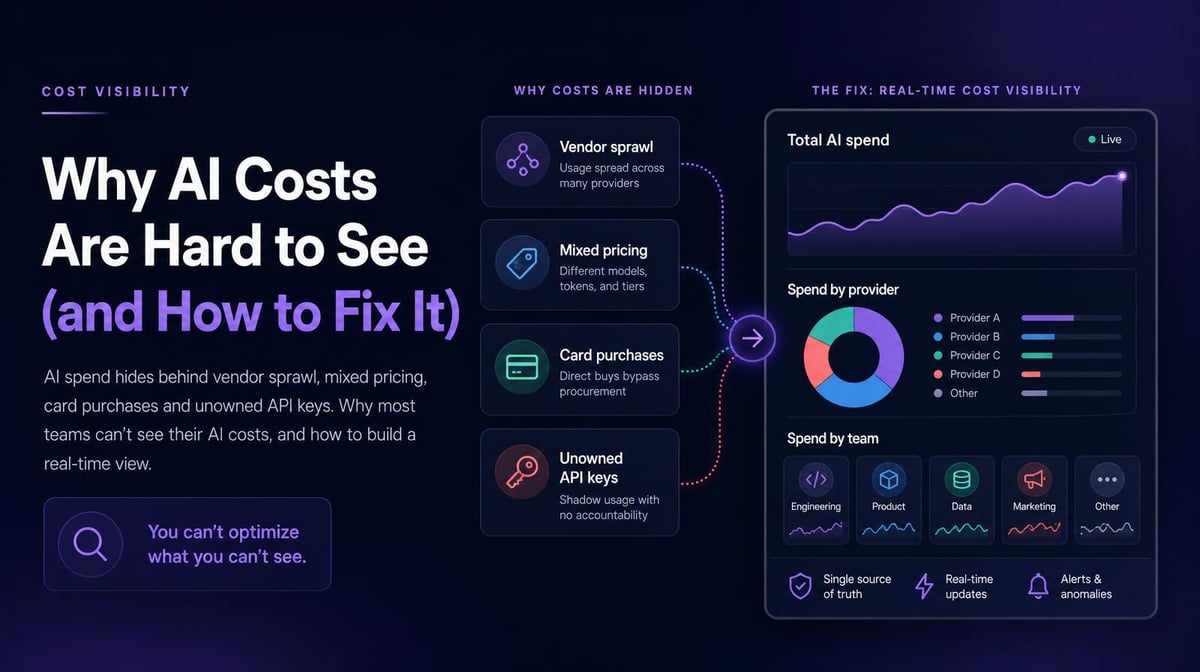
AI spend is hard to see because it comes through many purchasing and billing channels.
The doors that hide cost:
- Vendor count. Teams adopt chat assistants, coding tools, meeting tools, and agents from different vendors, and there are often several per category.
- Mixed pricing. Seats, usage-based fees, and raw tokens each report differently, and few finance systems normalize them.
- Purchases outside procurement. Individuals and managers expense AI subscriptions on cards, so the spend is scattered among various line items.
- Embedded AI. AI add-ons in existing SaaS raise renewal prices without appearing as AI spend at all.
- Unowned API keys. Agents and scripts call model APIs through shared keys, so token spend isn’t attached to any team.
- Invoice lag. Monthly bills show spending after the fact, which is too late to prevent unnecessary costs.
Any one of these is manageable. Together they leave finance with a total and no explanation.
What Does Poor AI Cost Visibility Cost You?
Poor visibility costs you overlapping tools, idle seats, surprise token bills, and renewal decisions based on anecdotal evidence.
It also makes ROI harder to measure. You can’t calculate a return on spend you can’t attribute to a team, a workflow or an outcome. When the CFO asks what the AI budget produced, the honest answer is “we don’t know,” which can lead to AI budget cuts across the board instead of targeted reductions in waste.
The upside of fixing it is concrete. Larridin reports its customers optimized a median of $2.4M in AI spend in their first year.
How Do You Fix AI Cost Visibility?
Build one ledger that captures every AI cost, maps it to people and teams, and updates fast enough to act on.
- Inventory every AI tool in use, combining expense data with device-level usage detection to catch tools procurement never saw.
- Connect vendor billing and usage data, including token spend by model.
- Map users to teams and cost centers through SSO or your HRIS.
- Refresh at least weekly, with alerts when a team or tool moves outside its normal range.
- Join spend to usage and outcomes, so cost per outcome sits next to total cost.
Larridin handles these steps in one platform: detection of approved and unapproved AI tools, Token Spend & Insights across vendors, and usage tied to productivity outcomes.
What Should a Real-Time AI Spend View Show?
A useful AI spend view answers who is spending, on what, and whether it’s paying off, without a spreadsheet export.
- Spend by vendor, tool, team and individual
- Paid seats versus active seats, by tool
- Token spend by model and by workload
- Month-to-date spend against budget, with trend
- Cost per outcome for the teams where outcomes are measured
Engineering teams can go a level deeper with per-developer AI coding budgets.
Where AI Cost Visibility Breaks, and How to Fix It
What you’re dealing with | What you need | How Larridin helps |
|---|---|---|
A company-level total with no breakdown | Spend by team, tool, and person | Token Spend & Insights maps cost to your org |
AI bought on cards and expense reports | Discovery of tools outside procurement | Detects approved and unapproved AI tools in use |
Token bills with no owner | Token spend tied to AI usage | Token Spend & Insights connects token costs to AI usage |
No way to show ROI | Spend joined to outcomes | Usage and spend correlated with productivity |
Key Takeaways
- AI spend hides behind vendor count, mixed pricing, card purchases, embedded AI and unowned keys.
- Monthly invoices arrive too late to change behavior.
- One cross-vendor ledger mapped to teams is the fix.
- Visibility is the prerequisite for any AI ROI number.
FAQs
Can cloud cost or FinOps tools cover AI spend?
They cover cloud infrastructure and some API usage well. They usually miss seat-based AI subscriptions, tools bought outside procurement, and individual employee usage.
Who should own AI cost visibility?
Finance should own the ledger, IT should own the tool inventory, and engineering should own coding and agent spend inside it.
Is real-time visibility necessary?
For token-heavy teams, yes. A runaway agent job can spend more in a weekend than a team’s seats cost all month.
How do we find AI tools bought on corporate cards?
Combine expense report data with device-level usage detection. Expense data shows what was paid for; usage data shows what’s being used.
Sources
- Larridin FAQ: AI spend visibility, discovery, and detection
- Larridin AI Token Spend & Insights: Cross-vendor cost tracking and attribution
- Larridin Series A announcement: Customer-reported AI spend optimization