

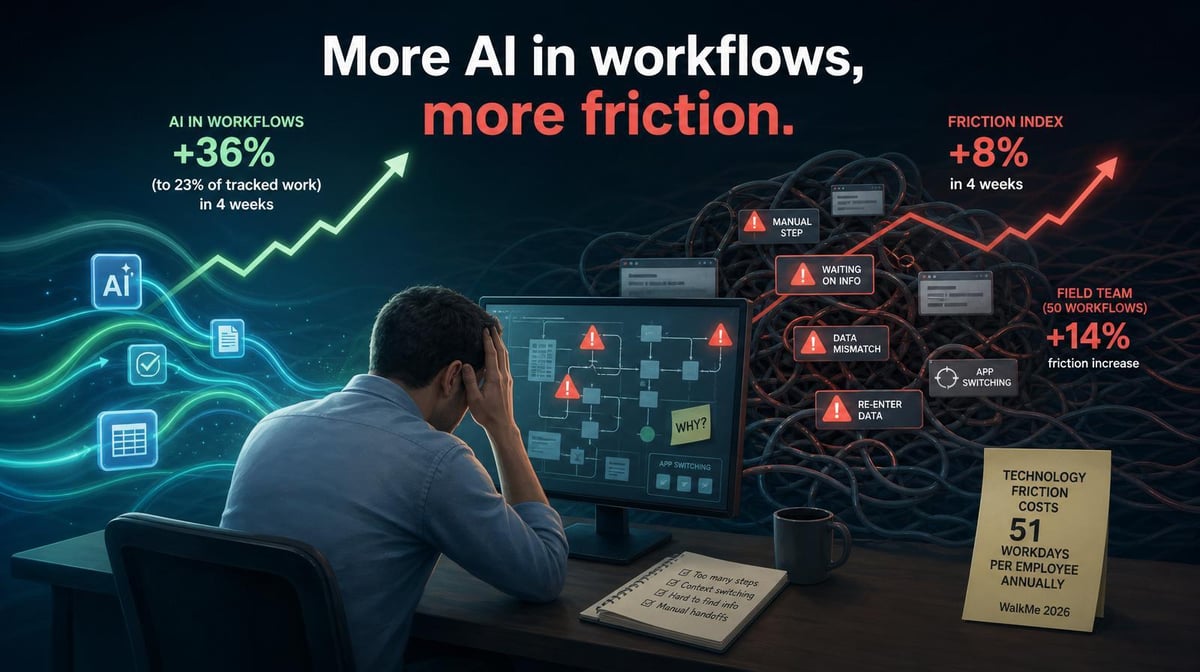

More AI doesn’t automatically make work easier. One Larridin customer’s workflow data shows why leaders need to measure friction alongside adoption.
Key Takeaways
- For one Larridin customer, the AI in Workflows metric rose 36% over four weeks, reaching 23% of tracked work. The Friction Index increased 8% during the same period, while one 50-workflow field team saw friction rise 14%.
- WalkMe’s 2026 research found that employees lose 51 workdays per year to technology friction, up 42% from 2025. It also found that 40% of digital investment underperforms.
- Workday’s 2026 research found nearly 40% of AI time savings are lost to correcting, verifying, or rewriting low-quality output. More AI activity can add work when the surrounding workflow isn’t improving with it.
What the Customer Data Shows
Over four weeks, AI presence in a Larridin customer’s tracked workflows rose 36%, reaching 23% of tracked work. The intuitive expectation is that more AI should reduce manual effort, handoff problems, and cognitive load.
That isn’t what the organization’s data showed. Its Friction Index rose 8% during the same period. One field team with 50 tracked workflows saw friction increase 14%.
AI appeared in more tracked workflows, and measured friction rose at the same time. That correlation is a signal to investigate, not proof that AI caused the increase. The data tells leaders that AI adoption and ease of work weren’t moving in the expected direction.
Market research shows why that question matters. WalkMe found employees lose 51 workdays per year to technology friction, while Workday found that rework consumes a substantial share of AI’s reported time savings. An AI deployment can look active and still leave employees with extra process steps, more system switching, or more output to fix.
That matters financially. A team can report more AI-assisted work while still paying for hidden review, navigation, and recovery time. Without workflow-level measurement, those costs disappear inside an adoption success story.
Why More AI Can Create More Friction
AI Output Requires Rework
AI can produce an answer quickly without reducing the total effort required to finish the task. When employees have to correct, verify, or rewrite the output, the workflow adds a new review step.
Workday found that 77% of daily AI users review AI-generated work as carefully as human work or more carefully. That diligence may be appropriate, but leaders should count the verification time when measuring whether the workflow improved.
Employees Switch Between More Systems
AI tools often supplement existing systems instead of replacing steps within them. Employees generate an output in one tool, move it into another system, add missing context, and complete the original process manually.
WalkMe found workers use an average of 2.88 applications per task, and 53% switch between two and three apps to complete one task. Adding AI without better integration can increase context switching instead of reducing it.
Ownership and Review Rules Are Unclear
Teams also lose time when no one knows who owns an AI-assisted output or how much review it requires. Employees may repeat checks, send work through extra approvals, or hesitate because the acceptance criteria aren’t clear.
The tool may still save time during generation. The end-to-end workflow can get slower if verification and handoff rules haven’t caught up.
What the Workflow Friction Score Measures
Larridin’s Workflow Intelligence platform tracks observed friction patterns such as context switching, manual repetition, and error recovery. It compares AI-assisted and non-AI runs of the same workflow to show where AI reduces effort and where it introduces new overhead.
That distinction matters because adoption metrics only show whether AI appeared in the workflow. Friction data shows whether the work was easier to complete. Leaders can see whether the increase is organization-wide or concentrated in a specific team, task, or workflow stage, which makes the response more targeted.
What to Do When AI Is Increasing Friction
Start by finding where the increase is concentrated. An 8% organization-wide rise can hide a much larger problem within a specific team, task, or handoff. In the customer data, the 50-workflow field team’s 14% increase was the stronger signal.
Then determine whether the friction comes from the tool, the workflow, or the fit between them. The right response may be:
- Redesigning unnecessary steps or handoffs
- Integrating the AI tool with the systems employees already use
- Clarifying ownership and review requirements
- Improving employees’ AI proficiency for the task
- Removing or replacing a tool that isn’t helping
Measure the workflow again after making the change. A redesigned process only counts as an improvement if friction falls without creating a new quality, governance, or cost problem elsewhere.
This is the difference between AI adoption and AI transformation. Adoption adds AI to the work. Transformation changes how the work gets done.
Frequently Asked Questions
What is workflow friction in the context of AI?
Workflow friction is unnecessary effort embedded in a process, including repeated work, system switching, error recovery, waiting, and extra review. In an AI-assisted workflow, the question is whether the tool reduces those burdens or introduces new ones.
How do we measure whether AI is reducing workflow friction?
Track observable behavior across the full workflow. Look at context switching, manual repetition, error recovery, waiting, and other steps that consume employee effort. Compare AI-assisted and non-AI runs, then examine whether friction changes as AI usage grows.
Why can adding AI make a workflow worse?
AI may add rework, another system to navigate, or an unclear review step. It can also be a poor fit for the task. Leaders need to examine the full process rather than assume faster generation means an easier workflow.
What is the financial cost of workflow friction?
WalkMe’s 2026 research found that employees lose 51 workdays per year to technology friction, up 42% from 2025. The cost depends on workforce size, compensation, and where the lost time occurs, but the operational impact can compound as organizations add more tools.
Measure Whether AI Is Making Work Easier
Larridin’s Workflow Friction Score helps leaders see whether higher AI usage is reducing workflow effort or adding another layer to manage.
Book a discovery call to see where friction is rising and what’s driving it.