


AI doesn't make every workflow faster. Sometimes it adds steps, rework, and friction. Larridin Spark data shows why leaders need to measure run time and friction instead of assuming more AI use means better results.
TL;DR
The Short Answer
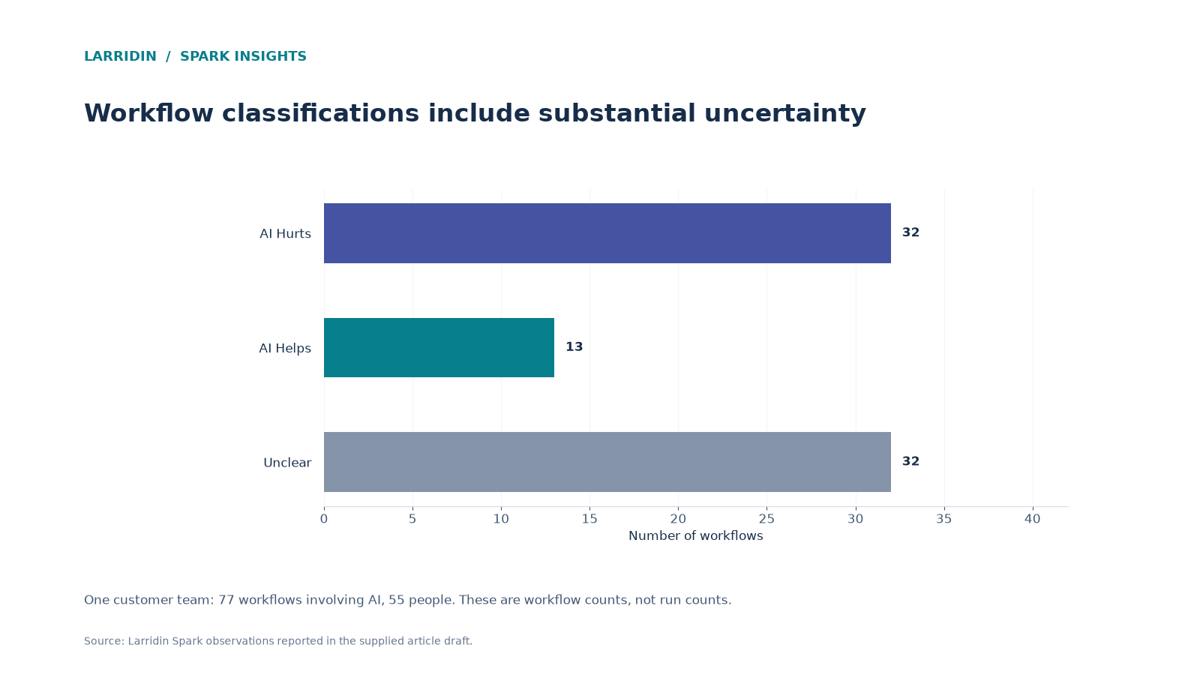
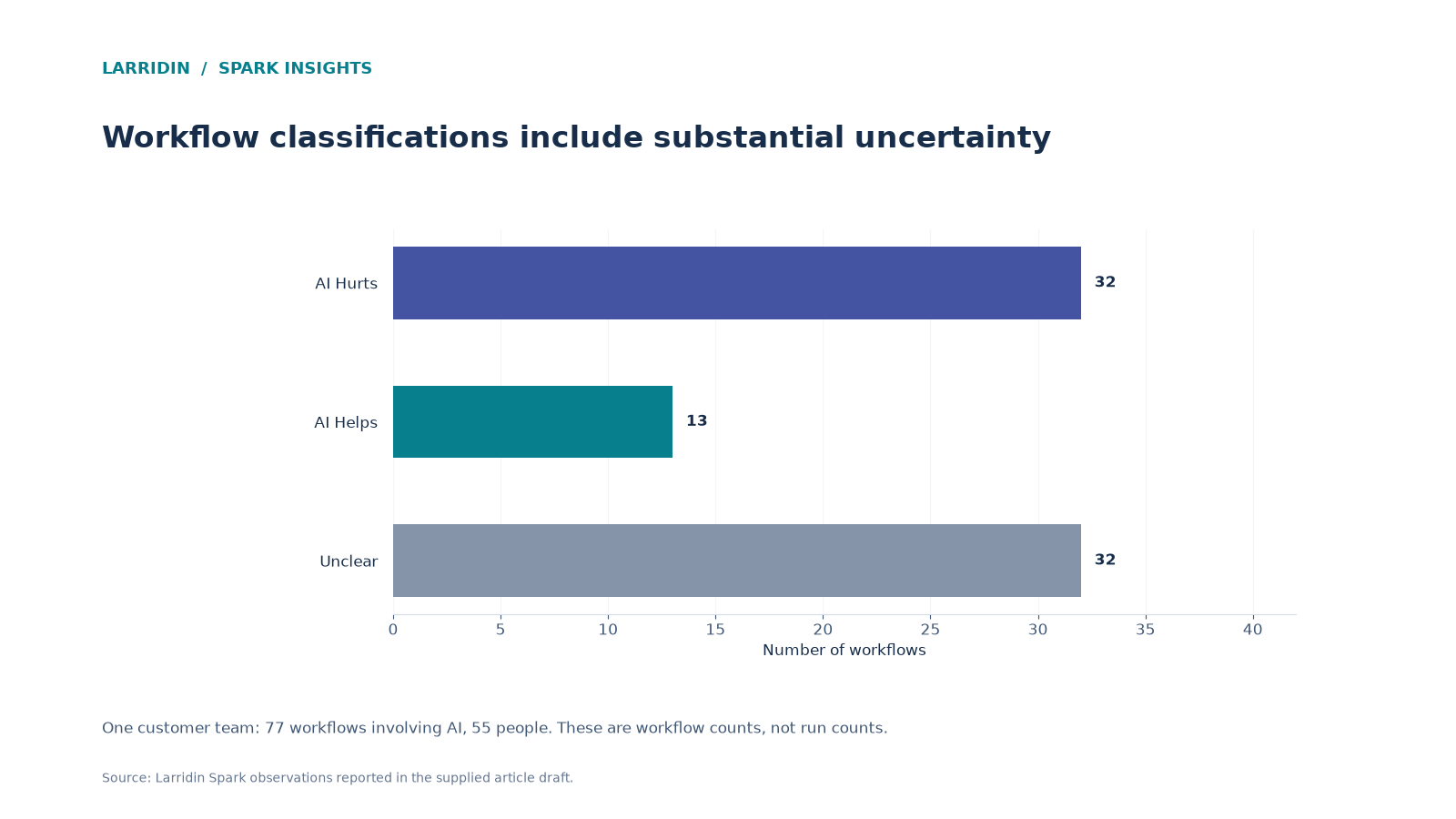
AI can make workflows slower or harder to complete, not just faster. In one Larridin customer's 55-person team, AI was classified as hurting 32 workflows, helping 13, and having an unclear impact on 32. Salesforce Record Management averaged 4.5 minutes with AI versus 3.5 without. In a separate customer, AI in Workflows rose 36% while friction increased 8%. These examples show why leaders need to measure both speed and friction.
Key Wins
- See where AI helps, hurts, or has an unclear impact on workflows
- Learn why friction matters alongside run time
- Find the workflows where AI should be fixed or removed
What’s a Spark Insight?
A Spark Insight is a data-backed finding Larridin surfaces automatically from how your teams actually use AI, flagging the patterns worth a leadership conversation.
Who This Matters To
COO · RevOps · Team leads
Quick Answers
| If you’re asking… | The answer | Go deeper |
|---|---|---|
| Can AI make work slower? | Yes. In one customer team, Salesforce Record Management averaged 4.5 minutes with AI versus 3.5 without. | The data |
| What does it mean when AI hurts a workflow? | AI-assisted runs perform worse than comparable non-AI runs based on duration, friction, or other observed workflow signals. | Definition |
| Is run time the best way to measure AI impact on workflows? | Not on its own. Friction, such as rework, back-and-forth, and errors, often shows problems that run time misses. | Why friction matters |
| What should I do with workflows where AI hurts? | Review the workflow, then improve or remove the AI step if needed. | What to do |
An AI rollout can increase tool use without improving the workflows those tools support. Adoption measures where AI is showing up. Comparing run time and friction helps reveal where it may be making work harder.
What You’re Struggling With, and How to Fix It
| What you’re struggling with | What you actually need | How Larridin helps | Proof from Spark data |
|---|---|---|---|
| “We added AI, but some processes feel slower.” | AI vs. non-AI workflow timing | Compares workflow time with and without AI | One customer team: Salesforce Record Management, 4.5 min with AI vs. 3.5 without |
| “I don’t know where AI is helping.” | A count of workflows AI helps vs. hurts | Classifies workflows as AI Helps or AI Hurts | One customer team: 32 AI Hurts vs. 13 AI Helps |
| “AI use is up, but work feels harder.” | A friction measure, not just speed | Tracks a Friction Index alongside AI usage | One org: AI in Workflows +36%; Friction Index +8% |
What This Means for You
If you’re a COO
The question you’re asked: “Is AI making our operations better?”
What to do: Review AI Helps, AI Hurts, and Unclear counts before expanding AI use in workflows with negative results.
For more on connecting AI use to outcomes, see AI Impact.
If you run RevOps
The question you’re asked: “Why are CRM tasks taking longer?”
What to do: Compare run time and friction for AI-assisted and non-AI CRM workflows before deciding what to change.
For more on understanding your processes, see AI Workflow Mapping 101.
If you lead a team
The question you’re asked: “Should my team use AI for everything?”
What to do: Use AI where measured outcomes improve. Investigate workflows where it adds time or friction.
For more on measuring workflow difficulty, see Friction Index.
What the Sparks Data Shows
- 32 AI Hurts vs. 13 AI Helps: Of 77 workflows involving AI in one customer's 55-person team, 32 were classified as AI Hurts, 13 as AI Helps, and 32 as Unclear.
- 4.5 vs. 3.5 minutes: Salesforce Record Management averaged 4.5 minutes across 19 AI-assisted runs and 3.5 minutes across 11 non-AI runs in that customer.
- +36% AI, +8% friction: In a separate organization, AI in Workflows increased 36% over four weeks while the Friction Index rose 8%. The figures don't establish that AI caused the friction increase.
How Can AI Make Work Slower?
By adding steps, review, and correction that outweigh the time it saves.
AI output often needs checking, editing, or re-entry into another system. When that overhead is larger than the time saved, the workflow gets slower. In one Larridin customer, Salesforce record management took 4.5 minutes with AI vs. 3.5 without.
Spark callout: In the same customer's 55-person team, 32 workflows were classified as AI Hurts and 13 as AI Helps. The other 32 had unclear results.
Myth: Adding AI makes workflows faster.
Reality: In one customer team, 32 workflows were classified as AI Hurts, versus 13 classified as AI Helps.
Why Measure Friction Alongside Run Time?
Because speed alone can miss rework and other problems that make a workflow harder to complete.
Run time shows how long a workflow takes. Friction captures context switching, manual repetition, error recovery, and backtracking. In one customer, AI in Workflows increased 36% while the Friction Index rose 8%. Those trends don't prove AI caused the increase, but they show why more AI use isn't necessarily evidence of better workflows.
What Should You Do About Workflows Where AI Hurts?
Investigate why the workflow is underperforming before deciding whether to fix or remove the AI step.
Some workflows need a better prompt, template, or integration. Others simply don’t benefit from AI. The point of measuring AI Helps vs. AI Hurts is to make that call per workflow, instead of assuming AI is always a net gain.
How to Measure This in Your Own Org
- Pick your highest-volume workflows. Start where small changes add up.
- Compare runs with and without AI. Measure the same workflow under both conditions.
- Track friction alongside speed. Look for context switching, repetition, error recovery, and backtracking.
- Review the verdicts. Larridin's Workflow Intelligence compares AI-assisted and non-AI workflow runs and classifies results as AI Helps, AI Hurts, or Unclear.
Frequently Asked Questions
What is a Friction Index?
A Friction Index is a score that indicates how difficult a workflow is to complete. Larridin calculates it using signals such as context switching, manual repetition, error recovery, and backtracking.
Does AI hurting a workflow mean the AI tool is bad?
Not necessarily. It often means AI is used in a way that doesn’t fit the workflow, such as adding a step that needs manual checking.
How many workflows should I measure?
Start with your team's highest-volume workflows, then expand as you establish a baseline.
Spark a Discussion About Where AI Helps and Where It Hurts
See AI Helps vs. AI Hurts for your workflows, and bring it to your next operations review.