


AI costs can jump because of an execution setting, routing rule, or workflow decision made long before finance sees the invoice. Finding those choices can unlock savings without limiting productive AI use.
Key Takeaways
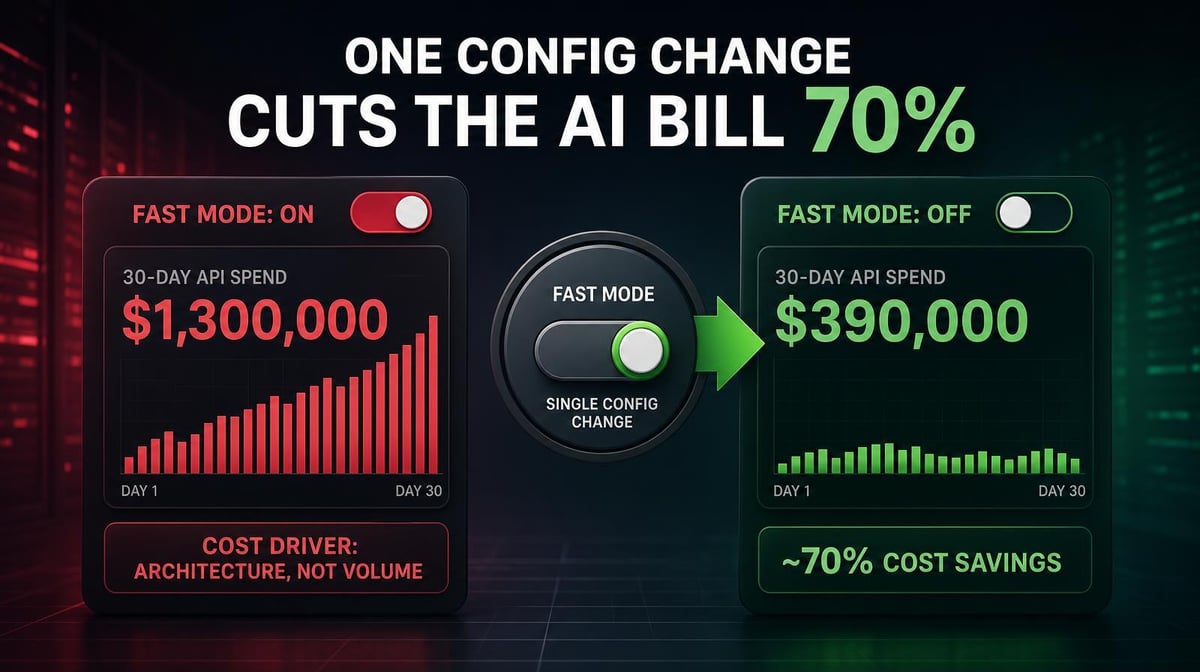
- OpenClaw creator Peter Steinberger ran roughly 100 Codex instances for 30 days, generating 603 billion tokens, 7.6 million requests, and $1.3 million in API costs. He said turning off Fast Mode would have reduced the bill to about $300,000.
- Cockroach Labs reported that one team cut monthly API spend from $40,000 to $24,000 after routing simpler subtasks to cheaper models. It’s one organization’s experience, not a universal savings benchmark, but it shows how routing choices can affect costs without changing the product.
- The right optimization target is total cost per acceptable result. Token price matters, but so do execution mode, retries, context size, caching, latency, and output quality.
Why Configuration Choices Can Dominate AI Costs
Steinberger’s experiment is extreme, but the lesson is practical. His team kept about 100 Codex instances running on OpenClaw, and OpenAI covered the resulting $1.3 million monthly API bill. Steinberger said standard execution would have cost about $300,000, so Fast Mode added roughly $1 million to the bill.
Most enterprises won’t run 100 coding agents without budget constraints, but they can still accumulate hidden costs at a smaller scale. A high-speed mode may be used for work that doesn’t need it, every task may default to the most capable model, or stable instructions may be reprocessed instead of cached.
These choices are often made during implementation and never revisited. Finance sees rising spend, while engineering sees one tool or workflow behaving as configured. Cost optimization starts by making those settings visible.
4 Configuration and Routing Levers to Check
1. Execution Mode and Reasoning Effort
Some providers charge more for faster execution or deeper reasoning. That premium can be worthwhile when latency or complexity materially affects the result. It’s wasted spending when standard settings work just as well.
Start with high-volume workflows using premium speed or maximum effort by default. Compare settings on the same tasks, then measure quality, completion time, tokens, and cost. Keep the premium only when the result justifies it.
2. Model Tier Routing by Task
Routine, repeatable work may be a candidate for a lower-cost model. Examples include classification, structured extraction, first-pass boilerplate, documentation, and standardized transformations. Complex reasoning, long-running agentic work, and high-stakes decisions are more likely to justify a frontier model.
The decision should be based on testing. A cheaper model can require more retries or create downstream rework, while an expensive model may finish in fewer steps. Larridin’s model tier routing framework recommends choosing the lowest-cost model that consistently meets the quality requirement.
In one company-reported example, Cockroach Labs said a team cut monthly API costs from $40,000 to $24,000 after routing simpler subtasks to cheaper models. Results will vary, but the example shows why routing belongs in an AI cost audit.
3. Caching for Repeated Input
Agentic workflows often reuse system instructions, tool definitions, codebase summaries, examples, and other stable context. Anthropic, OpenAI, and Google Cloud all support prompt or context caching that discounts eligible repeated input.
Caching works best when the reused portion is stable and appears consistently across requests. It won’t eliminate the growing context created by new file reads, tool results, or reasoning during a task. Still, it can reduce the cost of repeatedly processing the same foundation.
4. Context and Session Boundaries
Long agent sessions can carry more history into each new step. The result is more input processing, especially when the workflow repeatedly includes file contents, test output, and tool responses.
Set boundaries between separate tasks or phases, summarize useful state, and remove stale context before it follows the agent through the rest of the workflow. Our context accumulation guide explains how repeated input drives agent costs and where caching, pruning, and session design can help.
How to Find the Decisions Inflating Your Bill
Aggregate spend won’t show which configuration to change. Teams need to connect cost to the model, workflow, owner, and result.
Start with five questions:
- Which models and execution modes are driving the most spend?
- Which high-volume tasks use premium settings by default?
- Where are input tokens, retries, or session length unusually high?
- Which repeated inputs are eligible for caching?
- What did each workflow produce, and did it meet the quality requirement?
Prioritize high-spend patterns with a low-risk alternative to test. Run representative tasks through both configurations, then compare cost, quality, latency, retries, and downstream rework.
This process prevents a common optimization mistake: choosing the cheapest token price while ignoring the full cost of getting an acceptable result.
Make Configuration Costs Visible
Larridin’s Token Spend and Insights consolidates AI spend across tools and models, then traces tokens and dollars to teams, agents, projects, and use cases. That view helps leaders find where premium models and high-cost workflows are driving spend and decide which ones warrant a controlled optimization test.
Projected-overage alerts also surface rapidly growing spend before quarter close, giving engineering and finance time to investigate the cause instead of reacting after the invoice arrives.
Frequently Asked Questions
How do we know which models our teams are using for which tasks?
You need attribution by model, team, agent, project, and use case. Individual provider dashboards can show overall consumption, but they may not reveal whether a frontier model is handling routine work or whether the premium is producing a better result.
Will routing work to cheaper models reduce quality?
It can if the lower-cost model doesn’t meet the task’s requirements. Test representative work, define acceptance criteria, and compare total cost per acceptable result. Keep frontier models where they produce a meaningful quality or reliability advantage.
What is the fastest way to reduce AI token costs?
Check high-volume workflows for obvious premiums first: fast execution, maximum reasoning effort, frontier-model defaults, and repeated uncached input. These settings can often be tested without changing how employees work. The biggest opportunity depends on your actual spend pattern.
How should we prioritize configuration changes?
Rank opportunities by total spend, cost per completed task, and the risk of testing an alternative. High-volume, repeatable tasks with clear quality checks are usually safer starting points than complex or high-stakes workflows.
Find the Configuration Choices Driving Your AI Bill
Larridin makes AI cost patterns visible across models, teams, agents, and use cases so leaders can test targeted changes without guessing or applying blunt limits.
Book a discovery call to find your highest-value AI cost optimization opportunities.