


Most enterprises cannot answer the most basic question about their investment in AI applications such as Microsoft Copilot. Here’s a measurement framework that survives a CFO’s scrutiny.
Key Findings
- Only 21% of organizations measure AI impact beyond basic adoption metrics; the rest are flying blind on ROI.
- 37% of AI-generated time savings are consumed by rework, the hidden "AI productivity tax" that vendor metrics don't capture.
- A 6x engagement gap exists between power users and casual adopters of tools such as Microsoft Copilot, meaning that average usage statistics are misleading.
- The Input/Process/Output framework provides a structured approach: measure what goes in (adoption), how it's used (process integration), and what comes out (business outcomes).
- Sentiment is not measurement; employee satisfaction surveys about AI correlate poorly with actual productivity gains.
Our new Guide, AI Impact: The Complete Enterprise Guide (2026), describes the multiple measurements needed to effectively track the true impact of AI-powered applications in your business. But it’s valuable for a business to identify a single ROI figure for large investments.
For many organizations, Microsoft 365 Copilot is their largest initial investment in AI. Enterprise licenses for Office Copilot and Github Copilot have a listed price in the area of $30 per user per month at this writing, and are applicable to millions of Microsoft Office and Microsoft Github users. Some organizations have licensed Copilot for nearly every employee, at a total cost in the seven or even eight figures.
Given the size of the potential investment, the broad use of Office and Github, and the large potential to speed up computer-based work with AI, Copilot is a good example to use for a study of how to calculate AI.
Use this blog post and our Guide to help you create your own single and/or multiple measurements for AI implementation effectiveness.
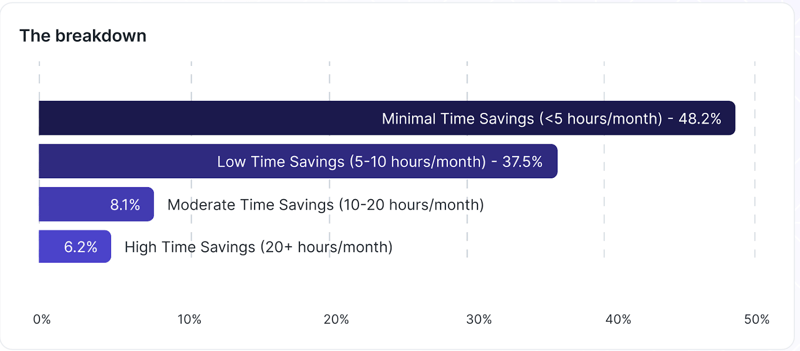
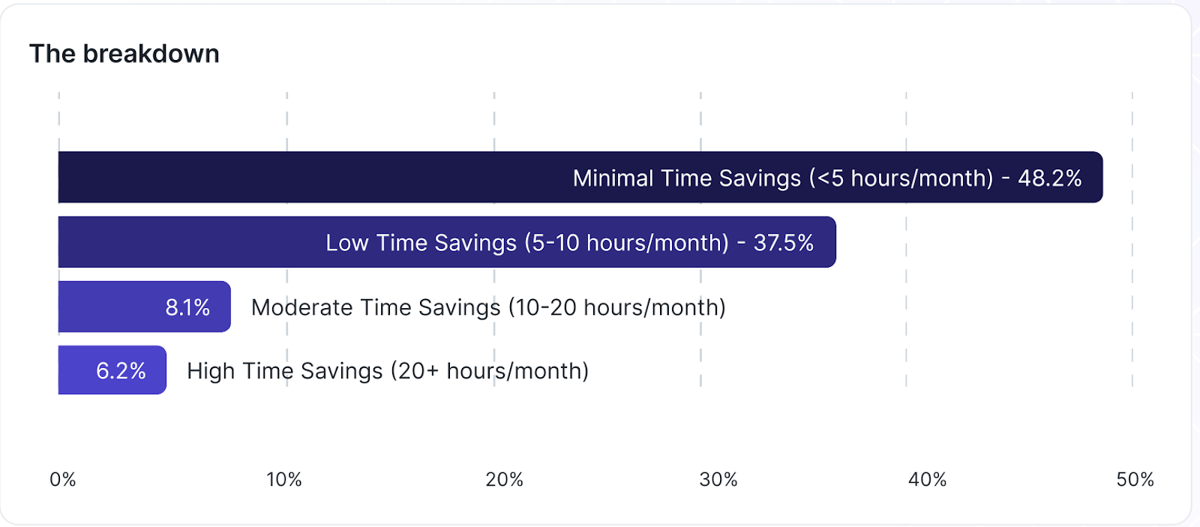
Figure 1. AI is saving a small amount of time for a large number of people,
and a large amount of time for a small number of people.
(From the Larridin State of Enterprise AI Report 2026.)
The Question You Cannot Answer Yet
So your organization spent seven figures on Copilot licenses: Microsoft 365 Copilot at $30 per user per month. GitHub Copilot across your engineering org. The board wants a number. The CFO wants a formula. And you are stuck between Microsoft’s marketing claims and a spreadsheet of anecdotal survey data from your employees.
You are not alone. S&P Global reports that only 21% of companies measure AI impact at all. Gartner found that establishing ROI is the single biggest barrier to further AI adoption. And a CNBC survey cited by SAMexpert found that half of technology leaders still could not say whether Copilot justified its cost, more than a year into their Copilot deployments.
The problem is not Copilot. The problem is how you measure it: counting licenses instead of value, trusting self-reported surveys over behavioral data, and conflating adoption with proficiency.
Why Copilot ROI Is Harder Than It Looks
Three structural problems break the traditional ROI model for AI assistants.
Time savings do not equal value. Microsoft’s Work Trend Index claims Copilot users are 29% faster at specific tasks. Forrester’s Total Economic Impact study projects 116% to 457% ROI for a composite organization over three years. Compelling numbers. But a Workday study of 3,200 employees found that 37% of time saved through AI is offset by rework – correcting, verifying, and rewriting AI outputs. Only 14% of employees consistently achieve net-positive outcomes. Every ROI projection built on gross time savings ignores this rework tax.
Self-reported data is unreliable. Employees overestimate productivity gains and underestimate rework time. Microsoft’s own Work Trend Index relies heavily on self-reported sentiment. Sentiment is not measurement.
Adoption does not equal proficiency. Seventy percent of Fortune 500 companies have adopted M365 Copilot, but penetration across the M365 base of 450 million paid seats hovers at roughly 3%. Even within organizations that have deployed licenses, OpenAI research shows a 6x engagement gap between power users and average employees using the same AI tools. Your ROI is not one number. It is a distribution shaped by skill.
The Framework: Input, Process, Output
Our framework follows a three-stage pipeline, grounded in the Productivity Roof model from our AI Impact guide. Each stage answers a different question. Skip any stage and the number collapses under pressure.
Stage 1: Input Metrics: Who Is Using It
What to measure: Active usage rate (not license assignment), feature-level adoption, frequency distribution, and the adoption spectrum, from Non-Users to AI-Native.
Why it matters: A 90% deployment rate with 30% weekly active usage means that 63% of your licenses, nearly two-thirds, produce zero return. If your internal activation mirrors the industry-wide 3% penetration pattern, your denominator is wrong and your ROI calculation is fiction.
Stage 2: Process Metrics: How Well Are They Using It
What to measure: Prompt sophistication (not simply length) over time, acceptance and retention rates of AI suggestions, iteration patterns, and the distribution gap between top-quartile and bottom-quartile users. This is the AI proficiency layer.
Why it matters: The 6x engagement gap means your average ROI is meaningless. A small cohort of power users may generate enormous value, while value realized by the majority nets out to zero after rework.
Stage 3: Output Metrics: What Business Value Did It Create
What to measure: End-to-end workflow throughput (not task-level speed), quality and rework rates, Cost of Delay reduction, and Capacity Reallocation Value – what the organization did with freed capacity, not just how many minutes were saved.
Why it matters: A developer who writes code 55% faster has not generated business value until that speed translates into faster feature delivery or fewer defects. Output metrics connect individual productivity to organizational outcomes.
Microsoft 365 Copilot: The $30/User/Month Question
M365 Copilot is the highest-profile enterprise AI deployment in the market. It’s also the AI deployment where the ROI question is most acute, because the cost is visible, the deployment is broad, and the value is diffuse.
The cost math is unforgiving. For 5,000 knowledge workers, full deployment costs $1.8 million annually. Unlike GitHub Copilot, where developer salaries make the breakeven obvious, M365 Copilot serves roles with vastly different value profiles. Saving a senior strategist 30 minutes daily is worth dramatically more than saving an administrative coordinator the same amount of time, but each time saving still costs $30/month.
What to track: Meeting summarization usage and accuracy, document drafting acceptance rates by role, email composition adoption, Excel feature depth; and, critically, whether time saved in one application creates improved end-to-end throughput or simply shifts bottlenecks.
The pitfall: Measuring through Microsoft’s native dashboard alone gives you a vendor-flattering, single-tool view. It will not show you whether employees are instead using ChatGPT or Claude for the same tasks, will not capture rework rates, and cannot tell you whether task-level speed translates into business-level throughput.
GitHub Copilot: Acceptance Rates, Code Quality, and the Real Math
GitHub Copilot has the strongest evidence base of any enterprise AI tool, because software development is relatively highly measurable.
The headline numbers. GitHub’s research shows developers complete tasks 55% faster. Pull request cycle time dropped from 9.6 to 2.4 days in some studies. Copilot generates 46% of code written by users, with Java developers reaching 61%. Acceptance rates range from 21% to 33% depending on the study – ZoomInfo’s 400-developer deployment reported 33% acceptance with 72% developer satisfaction and an estimated 20% time savings.
The Accenture case study. When Accenture deployed Copilot to 50,000 developers, they measured a 9% increase in pull requests per developer, 15% improvement in merge rates, and 84% increase in successful builds. The last number suggests that Copilot may improve initial code quality, not just speed.
The quality caveat. ZoomInfo developers cited limitations in domain-specific logic and inconsistent quality. An Uplevel Data Labs study found higher bug rates with Copilot access. A GitClear analysis of 153 million changed lines of code raised concerns about code churn in AI-assisted development. Guardrail metrics – defect rates, review depth, production incidents – matter as much as throughput.
The ROI breakeven is low. At $19/month per developer against blended salaries of $150,000+, even a 10% productivity gain pays for the tool many times over. LinearB’s analysis confirms this. The real question is not whether GitHub Copilot has positive ROI. It is how much of the theoretical gain you are actually capturing.
The Proficiency Gap: Why High Adoption With Low Proficiency Destroys ROI
This is the most important concept in Copilot ROI measurement, and the one most organizations miss.
High adoption with low proficiency is worse than low adoption. When employees use Copilot frequently but poorly: accepting suggestions without review, using basic prompts, failing to verify output; they create a compounding quality problem. The 37% rework tax concentrates in users who are the most active, but the least skilled.
The result is a paradox: your dashboard shows rising adoption, and your surveys show positive sentiment, but business outcomes are flat. You’re generating more output at lower quality.
How to detect it: Compare adoption metrics (Stage 1) against output metrics (Stage 3). If adoption is rising, but throughput and quality are flat, you have a proficiency problem. Segment users into quartiles by proficiency indicators, such as prompt complexity, edit rates, and rework frequency, and measure ROI by quartile. The gap between quartile 1 and quartile4 is your proficiency tax. Closing it is the highest-leverage investment you can make. Our AI Proficiency guide covers the methodology.
How to Build a Copilot ROI Dashboard
Three data sources, one view. Don’t start with telemetry alone.
Real-time telemetry. Usage data from Copilot admin dashboards, API logs, and browser-level monitoring. Adoption rates, feature patterns, acceptance rates. What people are doing, not whether it is working.
Business system integration. Connect usage data to business metrics. GitHub Copilot to deployment frequency and defect rates via CI/CD. M365 Copilot to cycle times and revision counts. This is where throughput and quality live.
Targeted pulse surveys. Quarterly surveys capturing proficiency self-assessment and rework burden. Triangulate survey results against behavioral data; never trust them in isolation.
Dashboard structure: Map to the Input-Process-Output framework:
- Top layer: adoption trends.
- Middle layer: proficiency distribution.
- Bottom layer: business outcomes and financial translation using Capacity Reallocation Value – what the organization did with freed capacity, not gross hours saved.
For the complete framework, see the full Guide: AI Impact: The Complete Guide.
Larridin measures AI proficiency across nine dimensions, recalibrated every 30 days, giving enterprises a real-time view of how effectively their workforce uses AI — and exactly where to invest to move the needle.
Learn how Larridin measures AI proficiency
For a deeper look at mapping AI to specific workflows, see our Workflow Mapping approach.
Engineering teams face unique measurement challenges. Our Developer Productivity Hub covers frameworks like DORA, SPACE, and complexity-adjusted velocity in the AI era.