


Larridin
TL;DR
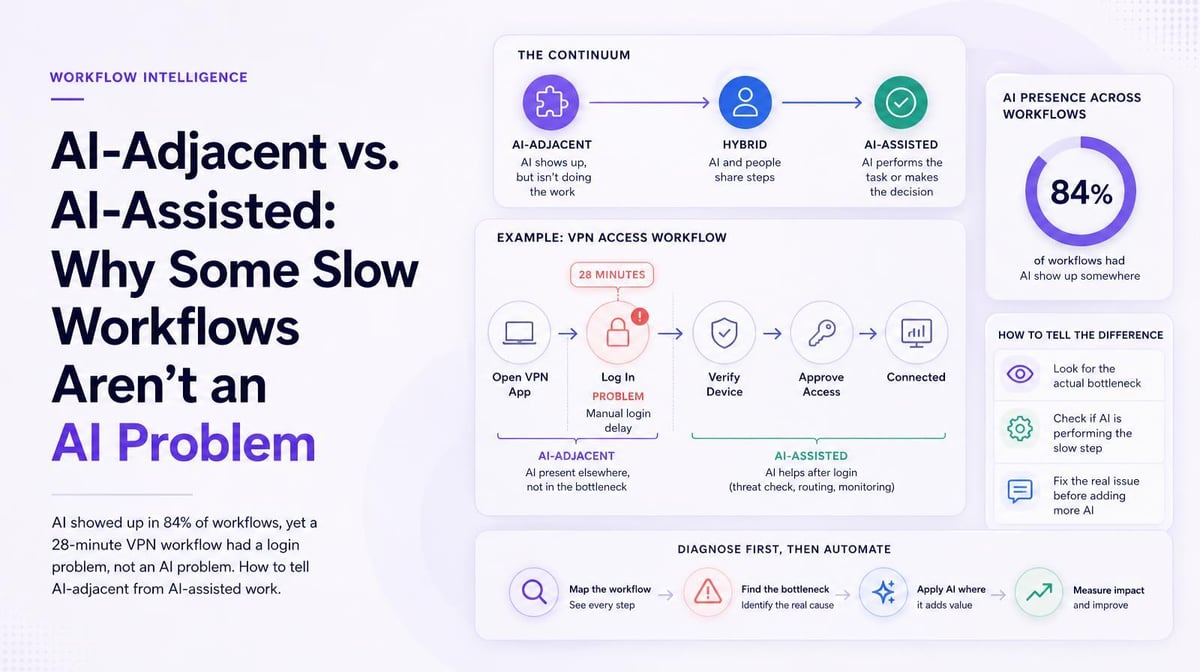
Short answer: “AI in workflows” measures the share of workflow runs involving AI, not whether AI improved the work. Some slow workflows involve AI even though the real friction is a login, a tool, or a policy. Read each workflow’s friction type before buying more AI, and send the fix to whoever owns the actual cause.
Key wins:
- Separate AI-assisted work from AI-adjacent work.
- Route friction to the right owner (IT, security, ops, or AI enablement).
- Spot AI-shaped workflows that still have no AI in them.
Who it’s for: CIOs, COOs, and transformation leads reporting AI’s reach.
What’s a Spark Insight? Sparks are short, data-backed findings Larridin surfaces from how AI is actually used across an organization. This post expands on one of them.
Quick Answers
If you’re asking… | The answer |
|---|---|
What does “AI in workflows” measure? | The share of tracked workflow runs involving AI. It doesn’t tell you whether AI improved the work. |
What’s AI-adjacent vs. AI-assisted? | AI-adjacent: AI is involved but doesn’t address the main bottleneck. AI-assisted: AI performs or speeds up meaningful steps of the work. |
How do I tell them apart? | Look at friction type and behavioral signals per workflow, such as repeated logins, manual re-entry, or backtracking. |
What if the friction isn’t AI-solvable? | Fix the cause. Authentication friction needs an SSO or session-policy change, not more AI seats. |
What We Hear From Leaders
- AI is in most of our workflows, so most of our work is AI-powered.
- If a workflow is slow, more AI should fix it.
Presence and impact are different measurements.
What you struggle with | What you need | How Larridin helps |
|---|---|---|
A headline “AI in workflows” number | Impact per workflow, not just presence | Workflow Intelligence shows AI presence alongside Friction Score per workflow |
Slow workflows routed to the AI team by default | The friction type behind each one | Friction types such as Auth, built from behavioral signals |
No sense of which fixes pay off | The cost of each workflow | Annualized workflow cost in the workflow table |
The Data: 84% AI Presence, a Login Problem Underneath
In one customer’s instance, Workflow Intelligence detected 633 workflows over four weeks. AI was involved in 83.7% of tracked workflow runs. That reads like a finished transformation.
One VPN connection verification workflow showed AI involvement in all six observed runs, across three people. Yet those runs still averaged 28 minutes each. The behavioral signals showed why: repeated re-authentication prompts mid-task, sessions dropping, and people retyping credentials and email addresses to get back in.
The workflow’s Friction Score was 33, with Auth as the main friction type. The workflow table put its cost at $256K a year. The fix to investigate was identity and session policy, not more AI.
The opposite case shows up too. In a field-operations org, one team’s Project Controls Verification workflow scored a Friction Index of 27, 2.7x the team average of 10. Behavioral signals flagged 3 of its 4 minutes as recoverable through automation. That’s structured, document-heavy work AI handles well, yet AI in workflows for that team had just fallen 50%, to 6%.
Why Does the Difference Matter?
Budget follows the headline number. If 84% of workflow runs involve AI, slow ones look like AI underperforming, so the response is more licenses or more training. When the friction is authentication, neither helps. Meanwhile, workflows worth automating stay manual because nobody is looking at them.
How Do I Classify a Workflow?
Ask two questions per workflow:
The matrix below is an editorial framework for assigning the next action, rather than a screenshot or feature view.
Friction is AI-solvable | Friction is not AI-solvable | |
|---|---|---|
AI present | AI present: check whether it helps, then improve or automate | AI-adjacent bottleneck: route to IT, security, or ops |
AI absent | Opportunity: enable AI here first | Fix the process or tooling |
AI-solvable friction includes manual repetition, copy-paste between systems, and document lookup. Non-AI friction includes authentication loops, broken integrations, and access requests waiting on approval.
How to Separate Ai-Adjacent From Ai-Assisted Work
- List your highest-cost workflows with AI presence and Friction Score.
- Read the friction type for each, not just the score.
- Place each workflow in the 2x2 above.
- Assign an owner by quadrant: AI enablement, IT or security, or process owners.
- Report presence alongside AI Helps vs. AI Hurts so the headline reflects impact.
FAQ
Is “AI in workflows” a bad metric?
No. It’s a useful reach metric. It just shouldn’t be read as impact.
What’s an Auth friction type?
Friction caused by logins, re-authentication, and session timeouts that’s detected from behavior like repeated credential entry.
How do I find workflows AI should be in?
Look for high-friction workflows with repetitive, structured steps and low AI presence.
Spark a discussion that moves your AI strategy forward. [Get your first Sparks]