

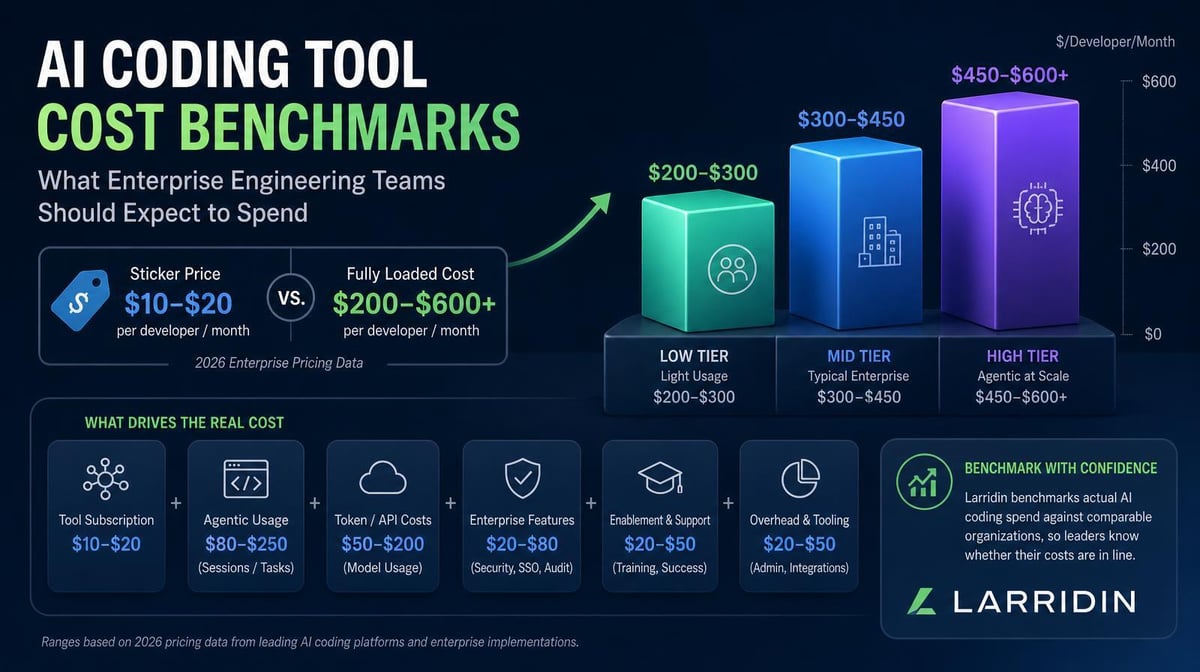

AI coding costs can start with a predictable seat price and climb quickly as teams add premium models, code review, cloud agents, and long-running workflows. A useful benchmark is a range based on your tool mix, usage patterns, operating costs, and durable delivery outcomes.
Key Takeaways
- Use three cost benchmarks to estimate total AI coding tool cost: contracted access, observed consumption, and full operating cost. The seat price is only the first layer.
- Build separate benchmarks for inline completion, interactive agent use, and automated or parallel agent workflows. Compare each with work that reaches production and lasts.
- Current vendor pricing shows how wide the starting range can be. GitHub Copilot Business costs $19 per user monthly, Cursor Teams Standard costs $32 per user monthly on an annual plan or $40 month to month, and Anthropic reports that Claude Code averages $150 to $250 per developer monthly across enterprise deployments.
- Inspect spend concentration and expensive outliers before setting allowances. Use caps, routing policies, and exception reviews to govern the measured range, not to replace it.
Why One Per-Developer Benchmark Does Not Hold Up
AI coding tools don’t sell or measure the same unit.
GitHub Copilot combines a seat with pooled AI credits. Cursor combines seat tiers with included model usage and on-demand charges. Claude Code can run through subscription capacity or API-based token consumption.
Agent costs also vary within the same workflow. A 2026 study of eight frontier models on SWE-bench Verified found that agentic coding tasks used about 1,000 times more tokens than code reasoning and code chat in the study setup. Runs on the same task varied by as much as 30 times, and greater token use did not consistently improve accuracy.
Those differences make a single “industry average” inaccurate for budgeting.
The 3 Cost Benchmarks Every Team Needs
1. Contracted Access
Start with the minimum committed software cost.
GitHub Copilot Business costs $19 per user per month and includes 1,900 AI credits per user in a shared organizational pool. Copilot Enterprise costs $39 per user per month, includes 3,900 credits per user, and is available to GitHub Enterprise Cloud customers.
Cursor Teams Standard costs $32 per user per month with annual billing or $40 monthly. Premium costs $96 per user per month with annual billing or $120 monthly and includes five times the Standard usage.
For a 100-developer deployment, those prices have very different annual minimums:
- Copilot Business: $22,800
- Copilot Enterprise: $46,800, excluding any incremental GitHub Enterprise Cloud cost
- Cursor Teams Standard: $38,400 annually or $48,000 month to month
- Cursor Teams Premium: $115,200 annually or $144,000 month to month
These benchmarks are only for access and don’t include additional consumption, implementation, administration, review, and remediation costs.
2. Observed Consumption
The second benchmark shows what teams actually use once they have access.
Track AI credits, tokens, premium models, code review, cloud agents, background agents, API calls, and supporting infrastructure. Attribute the usage to the developer, team, repository, workflow, and business unit that generated it.
Anthropic says Claude Code costs average about $13 per developer per active day and $150 to $250 per developer per month across enterprise deployments. It also says costs vary widely with model selection, codebase size, parallel sessions, and automation.
At that documented average, 100 consistently active Claude Code users would generate a monthly usage line of roughly $15,000 to $25,000 before implementation or downstream labor. That is a Claude Code planning input, not a universal benchmark.
Build low, expected, and high consumption ranges from at least four weeks of actual usage. Separate interactive sessions from automated and parallel agent runs so one workflow does not distort the rest of the portfolio.
3. Full Operating Cost
The third benchmark adds the work required to deploy, govern, review, and support the tools.
Include:
- Security, legal, procurement, and implementation labor
- Identity, policy, repository, and workflow configuration
- Training, enablement, and support
- Usage monitoring and financial administration
- Human review, debugging, rework, and remediation
- Incident response, security findings, and maintenance
- Idle seats, overlapping tools, and unused commitments
Convert internal labor into cost using the organization’s loaded rates. Separate one-time rollout costs from recurring operating costs so the first year doesn’t distort the steady-state benchmark.
Larridin’s AI Coding Tool TCO framework explains how to organize these cost lines into one model.
Benchmark by Workflow, Not Just by Developer
Different AI workflows can cost very different amounts. Group costs by the work being done, not just by developer.
Inline Completion and Light Chat
This is usually the most predictable workflow because it uses fewer long-running agent loops and may be covered by a seat allowance. Benchmark seat utilization, accepted work that reaches committed code, and cost per durable change.
Interactive Agent Work
Developers assign bounded tasks, review the result, and intervene as needed. Track cost per completed task, retries, human intervention, review time, and whether the resulting work merges and lasts.
Automated and Parallel Agents
Background agents, scheduled runs, and parallel sessions can consume resources without continuous developer attention. Benchmark cost per run, failed loops, token variance, infrastructure, and human remediation.
Multi-Tool Workflows
A developer may use Copilot, Cursor, and Claude Code in the same delivery cycle. Don’t add each vendor dashboard’s user totals together. Normalize identities, time periods, repositories, and costs, then connect the combined activity to shared delivery and quality outcomes.
Our guide to tracking AI coding costs by team shows how to allocate this spend across repositories and business units.
Add Spend Distribution to the Consumption Benchmark
A team average can hide the workflows driving the bill. Track the typical range alongside expensive runs, each engineer’s share of spending, and changes over time. Segment those patterns by tool, model, repository, and work type before deciding that one developer is unusually costly.
Larridin’s August 21, 2026 spend-concentration analysis describes one customer environment, not a market-wide benchmark. Across 12 weeks, the engineering organization spent $79.8K on Claude, Codex, and Cursor. In one week, one engineer generated roughly 65% of the total. The following week, that engineer’s spend fell by half while another engineer’s spending rose more than sixfold. The reported 92.4% weekly active usage rate did not reveal that distribution.
These are source-reported internal customer observations. The article does not specify the organization’s size or exact observation dates, so the total should not be converted into a representative per-developer allowance. The useful lesson is methodological: broad adoption and an aggregate bill can coexist with a concentrated, rapidly changing cost pattern.
Investigate the Work, Not Just the Spender
Ask what the spending produced, why the cost was high, and whether the pattern is temporary or recurring. A complex delivery task, a defined experiment, premium-model selection, parallel agents, and repeated failed loops can all generate a high bill. They require different responses.
Pair cost with complexity-adjusted throughput, delivery time, code durability, review effort, rework, and incidents. A high-cost workflow producing accepted, durable output may justify expansion. Recurring high costs with weak results call for workflow changes, better routing, or reduced consumption. For experimentation, record the objective, owner, budget, and review horizon before treating the result as a steady-state benchmark.
Keep expensive outliers visible in the high-consumption scenario rather than silently averaging them away. Use enough history to distinguish a temporary event from a recurring pattern; an initial measurement window is a starting point, not proof that the range has stabilized.
Turn Cost Benchmarks Into Budgets Without Mistaking a Cap for a Cost Estimate
A benchmark describes the cost of comparable work. A budget defines the spending plan. A cap sets an execution or approval boundary. Those numbers serve different purposes. A company’s allowance is not evidence that every engineer should spend that amount, or that spending below it creates value.
The August 14, 2026 review of Uber, Microsoft, and DoorDash’s budgeting approaches shows how organizations combine limits with tool strategy and accountability:
- Uber: boundaries plus better defaults. The review reports that Uber introduced a $1,500 monthly cap per employee and per agentic coding tool after exhausting its annual AI coding budget in four months, with usage visibility and approved exceptions. It also summarizes Uber’s August 2026 Q2 prepared remarks: better defaults, lower-cost and open-weight models, and employee cost visibility helped lower cost per token while adoption rose and total AI spend remained relatively stable. The cap is a reported policy example, not a recommended enterprise benchmark.
- Microsoft: toolchain and division-level control. The review reports a move from Claude Code to GitHub Copilot CLI in Experiences and Devices, followed by division-level token budget targets and a lower-cost default model. Shared budgets and centrally chosen defaults place responsibility on the organization as well as the individual. Compare capability, adoption, and durable results before assuming consolidation improves economics.
- DoorDash: high limits with overage review. The review describes a high monthly token limit, with engineers who exceed it explaining the cause and committing to an efficiency plan. No specific allowance is supplied. The transferable practice is the checkpoint, not an invented dollar threshold.
Set a Default Range and a Useful Exception Path
Use your measured workflow ranges to set default allowances or differentiated tiers. Give engineers a current view of spending by tool, model, and workload, with the remaining budget and projected exposure. For exceptions, capture the task, expected duration, estimated cost, and why a lower-cost option is insufficient.
Route routine work to lower-cost models where quality supports it, and reserve more expensive models for tasks that justify them. Review overlapping tools using the full operating-cost framework, not license price alone. Define whether each threshold is an alert, an approval requirement, or an enforced stop; verify that the execution system supports the intended control.
Use Concentration as a Review Trigger, Not an Automatic Restriction
A uniform cap can constrain productive high-use work while leaving inefficient workflows below the threshold untouched. Investigate unusual spending before changing access. Approve justified work, improve context and retry behavior, change model routing, or stop activity that repeatedly produces little durable value. Per-engineer spend is an input to that review, not a performance score.
How to Know Whether Your Spend Is High or Low
A high per-developer cost doesn’t automatically mean waste, and a low cost isn’t automatically efficient.
Compare total cost with durable outcomes:
- Define comparable teams, repositories, and workflows.
- Capture access, consumption, and operating cost for each segment.
- Connect spend with committed output, delivery speed, quality, code durability, and business priorities.
- Calculate cost per durable outcome, such as a production change that survives 30 or 90 days.
- Review the range monthly and reset assumptions when pricing, adoption, or workflow mix changes.
The 2026 State of FinOps report found that 98% of respondents who answered its AI-spend question now manage AI spend. The report also identified visibility, allocation, and value measurement as central challenges.
Larridin’s Token Spend & Insights brings costs across tools, teams, agents, workflows, projects, vendors, and models into one view. Pair that data with delivery and quality signals so leaders can see whether higher spending is producing more durable value.
Frequently Asked Questions
What should a 100-developer team budget for AI coding tools?
Start with what the selected tools cost, then add actual usage and organization-specific operating costs. A team using mostly Copilot Business has a different baseline from one with Cursor Premium seats or sustained Claude Code agent use. Use a range until the first several weeks of consumption and review data are available.
Is $150 to $250 per developer per month a reliable benchmark?
That’s Anthropic’s documented average for Claude Code across enterprise deployments, not a market-wide average for all AI coding tools. Use it to plan Claude Code scenarios, then replace the assumption with your own measured usage.
Why can two teams using the same tool have very different costs?
Model choice, repository size, task complexity, context length, agent retries, parallel sessions, automation, review burden, and rework can all change the total. Seat price may be identical while consumption and labor differ substantially.
How often should cost benchmarks be updated?
Review consumption, overages, utilization, and cost anomalies monthly. Revisit seat mix, workflow assumptions, labor, quality-related costs, and vendor pricing quarterly and before renewals.
Should every engineer have the same AI coding budget?
Not necessarily. A shared default simplifies planning, but role, task complexity, tool mix, and automation create different cost patterns. Use measured workflow ranges and an exception process rather than copying another company’s cap.
Does one engineer generating most of the spend mean the benchmark is too high?
No. Concentration identifies where to investigate. Compare the work’s purpose, delivery, durability, review burden, and cost over time. A productive high-cost workflow and repeated unsuccessful execution should not receive the same response.
What should happen when a developer exceeds the allowance?
Review the cause and outcomes before deciding. Approve valuable work where affordable, adjust model routing or workflow design, or reduce consumption that repeatedly creates rework. Update the forecast when the change reflects a recurring workload rather than a temporary exception.
Build a Benchmark Finance and Engineering Can Defend
Larridin connects AI coding spend with adoption, workflows, delivery, quality, and durable output. Leaders can compare tools and teams using the same cost model, identify where spending is rising, and decide which workflows justify more investment.
Book a discovery call to build your AI coding cost benchmarks.
Related Resources
- Per-Developer AI Budgets: What Uber, Microsoft and DoorDash’s Playbooks Actually Reveal
- One Engineer Is Driving Most of Your AI Spend. Is That Actually a Problem?
- AI Coding Tool TCO: Build the Budget Beyond the License Price
- How to Track AI Coding Costs by Team, Repository, and Business Unit
- GitHub Copilot vs. Claude Code vs. Cursor: Compare Total Cost, Not Just Seat Price
- Token Spend & Insights