


Published June 25, 2026
You’re spending millions on AI tools. But do you actually know where AI is running inside your company right now? Most organizations do not, and that gap is becoming one of the most expensive blind spots in business.
Key Takeaways
AI workflow mapping shows where AI tools are running across your business, what they’re doing, and where to optimize next.
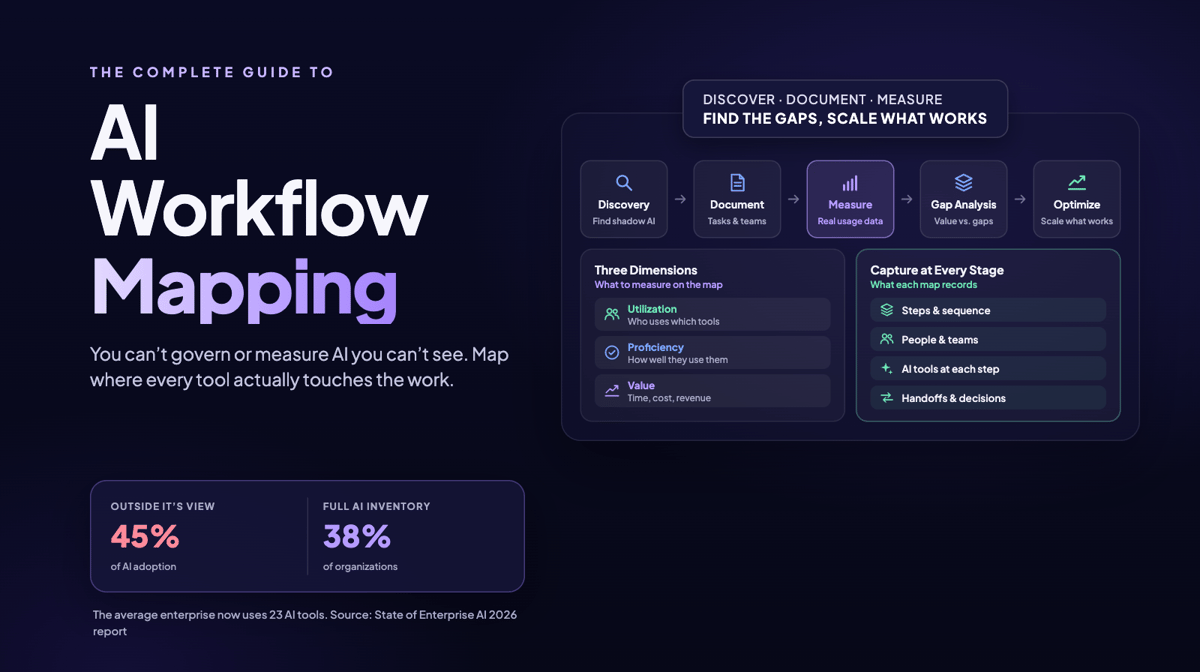
Our research found that 45% of AI adoption happens outside of IT’s view. Without a structured workflow map, you can’t see where AI is actually being used.
Real-time, automated workflow mapping helps you scale what works and fix what doesn't instead of guessing.
Key Terms
- AI Workflow Mapping: The process of discovering, documenting, and measuring how AI tools are used across every team and business process in an organization.
- Utilization: How often and by whom AI tools are actually used, measured in real time.
- Proficiency: How well employees use AI tools, including prompt quality, feature adoption, and output quality.
- Value: The measurable business impact of AI usage, including time saved, revenue influenced, and costs reduced.
- Shadow AI: AI tools that employees use without official IT approval or visibility.
- Process Mining: Automated discovery of how work actually flows through systems, using data instead of interviews.
- Workflow Telemetry: Real-time data about tool usage, task sequences, and application interactions captured from the systems where work happens.
- Business Process Model and Notation (BPMN): The standardized diagramming language used in traditional process management.
- Swimlane Diagram: A workflow diagram that organizes process steps by team or role, making cross-functional handoffs and dependencies visible.
- Value Stream Mapping: A lean process mapping methodology that visualizes the end-to-end flow of value from input to output, highlighting bottlenecks and unnecessary steps.
Quick Navigation
- What Is AI Workflow Mapping?
- The Three Dimensions of AI Workflow Measurement
- How to Map AI Usage Across Your Company
- Types of AI Workflow Maps
- What Tools Support AI Workflow Mapping?
- How AI Workflow Mapping Differs From Traditional Process Mapping
- Workflow Mapping Across Functions
- FAQs
What Is AI Workflow Mapping?
AI workflow mapping is the practice of finding, documenting, and measuring how AI tools are actually used across your organization by CIOs, CISOs, COOs, engineering and more. It answers questions most leadership teams cannot answer today: which teams use AI, how often they use it, which tasks they use it for, and whether it makes a measurable difference. We built our Workflow Intelligence platform because we kept hearing the same thing from enterprise leaders: they deployed AI company-wide, but didn't know how work was actually getting done.
Process mapping can also be used to connect AI Spend to workforce productivity and business outcomes.
Traditional process documentation was built for a pre-AI world. It relied on workshops, brainstorming, interviews, and static diagrams. Those methods can’t keep up with AI adoption as it spreads through every department, often without any central oversight.
AI workflow mapping replaces that static picture with a real-time, continuous view of AI usage across the organization. Every tool, team, and workflow is surfaced automatically as work happens.
Why Workflow Mapping Matters Right Now
Our State of Enterprise AI 2026 report found that 45% of AI adoption happens outside IT’s view. The average enterprise is now using 23 different AI tools, but only 38% of organizations maintain a comprehensive inventory of what’s actually running. That’s not a governance problem you can solve with a policy. It requires continuous, automated visibility into how AI moves through the business.
The pressure is real and growing fast. As we noted in our State of Enterprise AI 2025 blog, 85% of leaders are concerned they could fall behind competitors on AI within the next 18 months. Without a workflow map, you’re making investment and governance decisions based on incomplete data.
Without a clear map of AI usage across your organization, you can’t govern it, optimize it, or prove its ROI. You’re making multi-million-dollar decisions based on spreadsheets and assumptions.
The Three Dimensions of AI Workflow Measurement
Effective AI workflow mapping isn’t just about drawing diagrams. It measures three dimensions that together tell the full story of AI performance in your organization. We cover these in depth in our AI Measurement Frameworks guide, and they underpin everything we build at Larridin.
Dimension 1: Utilization
Utilization answers: who’s using AI, which tools they’re using, and how often. Our AI Adoption dashboard captures this at the team and role level in real time, surfacing the gap between licenses purchased and employees who are genuinely active. Buying 100 AI licenses doesn’t mean 100 team members are using them productively. In our experience, real-world adoption almost always looks different from what procurement shows on paper.
Dimension 2: Proficiency
Proficiency answers: how well are people using AI? This is where most organizations have zero data. Our AI Fluency measurement tracks prompt sophistication, advanced feature adoption, output quality, and workflow integration depth. We consistently find that the highest-value AI users in an organization aren’t always the most senior people. Sometimes the best signal is a mid-level analyst in finance who has figured out a workflow that saves 10 hours a week. A map surfaces that.
Dimension 3: Value
Value answers: what business impact is AI actually delivering? Our AI Impact platform connects AI usage to outcomes: time saved per employee, cost reductions, productivity gains, revenue influenced, and customer satisfaction improvements. This is the dimension that CIOs, CFOs, and boards need to see. It’s impossible to calculate without utilization and proficiency data first. You can account for every AI token and dollar, across tools, agents, teams and outcomes.
How to Map AI Usage Across Your Company
Here’s a practical, step-by-step approach to building your AI workflow map. This reflects the process we guide clients through, from the first deployment to a continuously optimized workflow intelligence system.
Step 1: Discover What AI Is Already Running
The first step isn’t planning; it’s discovery. You need to know which AI tools are already being used before you can manage them. The workflows that take up thousands of employee hours each month are often hiding in plain sight, especially when teams use AI outside formal IT channels. Structured workflow telemetry makes that activity visible.
This includes sanctioned IT tools, shadow AI tools employees use on their own, and AI features embedded inside existing SaaS platforms. In our work with enterprises, we regularly find that IT doesn’t know about the most-used AI tools.
Step 2: Document Current Workflows
Once you know what tools are running, map how they are being used. Which tasks involve AI? Which teams rely on it daily versus occasionally? Which process steps have AI embedded, but not measured?
Good workflow documentation captures the sequence of steps, the people and teams involved, the AI tools that touch each step, the decision points, the handoffs between teams, and the outputs produced. Use swimlane diagrams to make cross-functional dependencies visible. The goal is a living record, not a static PDF.
Step 3: Measure Utilization, Proficiency, and Value
With discovery and documentation in place, apply the three-dimension measurement framework. Connect your workflow map to real usage data. Measure who is doing what, how well, and what business outcomes result.
This is where AI workflow mapping becomes a strategic tool rather than just a documentation exercise. It turns your process map into evidence for every AI investment decision.
Step 4: Identify Gaps and Optimization Opportunities
Your map will reveal three things: where AI drives value, where AI is used but underperforming, and where AI is absent but could add impact. These are your three optimization levers.
Traditional consulting-led process mapping can be slow and expensive. By the time the report arrives, AI tools may have changed, and teams may already be working differently. Automated AI workflow mapping replaces that point-in-time view with continuously updated visibility grounded in observed behavior.
Step 5: Optimize, Scale, and Standardize
Use the data to make decisions. Scale the tools and workflows that deliver measurable value. Invest in proficiency training where utilization is high, but outcomes are low. Remove or replace tools that aren’t contributing to measurable business outcomes. Standardize the best-performing workflows as SOPs (Standard Operating Procedures) so the whole organization can benefit, not just the teams that figured them out first.
This is the competitive advantage of AI workflow mapping: you stop making decisions based on vendor promises and start making them based on your own evidence. The Larridin Platform can handle all of this, or you can do it manually or have a consultant manage the process.
Types of AI Workflow Maps
Not every workflow needs the same level of detail. These are the main formats we see organizations use.
High-Level Process Flow
An overview of major workflow categories that shows which departments use AI and which tools are involved at each stage. Useful for executive communication and strategic planning.
Swimlane Diagram
Organizes workflow steps by team or role, which makes cross-functional handoffs and dependencies clear. Particularly valuable for complex workflows that span multiple departments.
Value Stream Map
Borrowed from lean manufacturing methodology, a value stream map visualizes the end-to-end flow from input to output. It highlights bottlenecks and redundancies where AI could streamline operations and reduce unnecessary steps.
SIPOC Diagram
A structured format that maps suppliers, inputs, process, outputs, and customers for each workflow. Useful for understanding the full context of a process before deciding where AI can add value.
Detailed Process Map
A granular, step-by-step map that includes decision points, subprocesses, system integrations, and individual task assignments. This level of detail is appropriate for compliance documentation or before automating a high-volume workflow.
What Tools Support AI Workflow Mapping?
Larridin Workflow Intelligence
Our Workflow Intelligence platform continuously maps how work flows across tools, teams, and AI agents. It surfaces where AI is already running, where it’s stalling, and where the next automation opportunity is. We deploy in days and start delivering insight in weeks.
Process Mining Tools
Platforms like Celonis extract workflow data from system event logs to show how work actually flows, rather than how it was designed to flow. They’re valuable for mapping existing processes before AI is introduced and measuring how AI changes those processes over time.
Collaborative Diagramming Tools
Tools like Lucidchart, Miro, and Microsoft Visio support manual workflow documentation through templates, flowcharts, and swimlane diagrams. They’re appropriate for communicating process maps to stakeholders who need a visual reference, but they don’t provide the automated measurement layer that enterprise AI governance requires.
How AI Workflow Mapping Differs From Traditional Process Mapping
Traditional Business Process Management (BPM) was built around workshops, interviews, and manual BPMN diagrams. A team of analysts would spend weeks talking to employees, drawing process maps, and documenting assumptions. The result was a snapshot that was often outdated before it was published.
AI workflow mapping is fundamentally different in four ways.
- It’s continuous, not point-in-time. Your map updates as workflows change.
- It’s data-driven, not assumption-based. It captures what actually happens, not what people say happens in a workshop.
- It treats AI as both the subject of the map and part of the mapping process. AI surfaces patterns that human analysts would miss.
- It connects to business outcomes. Traditional process maps show steps. AI workflow maps show impact.
The automated nature saves time and effort, both people and wall time. It also clearly identifies the changes so you can see the biggest impacts and results.
For a deeper look at this comparison, see our article AI Process Mapping vs. Traditional BPM: The Real Difference.
Workflow Mapping Across Functions
AI workflows look different in every department. Here’s what we consistently see across the enterprises we work with.
Engineering and Development
Code generation, automated review, documentation, and test creation. This is often the easiest workflow category to measure because all output flows through version control. Our AI Dev Productivity platform connects directly to GitHub and Jira to measure what AI-augmented engineers are actually shipping.
Sales and Marketing
Content drafting, email personalization, lead scoring, and call summarization. These workflows are harder to measure because output is distributed across CRM platforms, email tools, and content systems. Shadow AI adoption tends to be highest here.
Finance and Operations
Report summarization, data analysis, contract review, and forecasting support. Finance teams often use AI tools outside official procurement. We regularly surface significant shadow AI spend in this function.
HR and People Operations
Job description writing, candidate screening support, employee onboarding, survey analysis, and policy documentation. These workflows have specific governance requirements for reducing bias and protecting data privacy that make clear workflow mapping essential, not optional.
Frequently Asked Questions
What is workflow mapping?
Workflow mapping is the process of documenting and visualizing how work flows through a business process, from inputs through each step to outputs. AI workflow mapping focuses on where and how AI tools are involved in those steps.
How do I map AI usage across my company?
Start with automated discovery to surface all the AI tools every team uses. Connect the tools to the processes they touch. Apply a measurement framework that tracks utilization, proficiency, and value. Use the data to identify gaps, remove underperforming tools, and scale what works.
What is the difference between a process map and a flowchart?
A flowchart shows the steps in a process using standard symbols for decisions, actions, and endpoints. A process map typically includes more context and shows the people, systems, inputs, and outputs at each stage, and cross-functional handoffs. An AI workflow map adds a measurement layer on top of this and connects process steps to actual usage data and business outcomes.
How is a workflow map different from a flowchart?
A workflow map is broader than a flowchart. It captures who does what, which tools they use, when each step happens, and which downstream dependencies matter. A flowchart is mainly a visual representation of sequence. A workflow map is an operational document that supports decision making.
What are the L1, L2, L3, and L4 process levels?
These represent levels of process detail. L1 is the highest-level view and shows major process categories. L2 breaks the process categories into groups. L3 shows individual workflows within each group. L4 is the most granular level and documents specific task steps and decision points. For AI workflow mapping, most organizations start at L2 or L3, then drill down where measurement data reveals the biggest opportunities.
Can workflow maps support automation directly?
Yes. A well-built AI workflow map identifies the specific steps that are repetitive, high-volume, and rule-based, which are the strongest candidates for automation. When combined with measurement data, your workflow map becomes a prioritized automation roadmap, not just a documentation artifact.
Who uses process mapping?
CIOs, CISOs, COOs, engineering leaders, and AI transformation leaders use process mapping. CFOs and CHROs also use process mapping to connect AI spend to workforce productivity and business outcomes.
Why is business process mapping important?
Without a documented map of how work flows, organizations can’t identify inefficiencies, standardize best practices, or make informed automation decisions. Process mapping also supports AI governance because you can’t govern AI tools you can’t see.
Map Your AI Workflows With Larridin
You can’t manage what you don’t measure. The first step to turning AI chaos into competitive advantage is knowing exactly what AI is running across your organization, which teams are using it, how well, and what it delivers. Larridin deploys in days and gives you a continuously updated workflow map without workshops, surveys, or consulting engagements.
Book a discovery call to see your AI workflow map.
Related Resources
- AI Workflow Mapping 101: Visualize and Optimize Every Business Process
- AI Process Mapping vs. Traditional BPM: The Real Difference
- Step-by-Step: Building an AI Workflow Map From Scratch
- What Tools Document How AI Is Changing Your Internal Processes?
- Automated vs. Manual Process Mapping: Which Is Right for Your Organization?
- AI Measurement Frameworks: Building a Repeatable Assessment Process
- State of Enterprise AI Report