




Scout

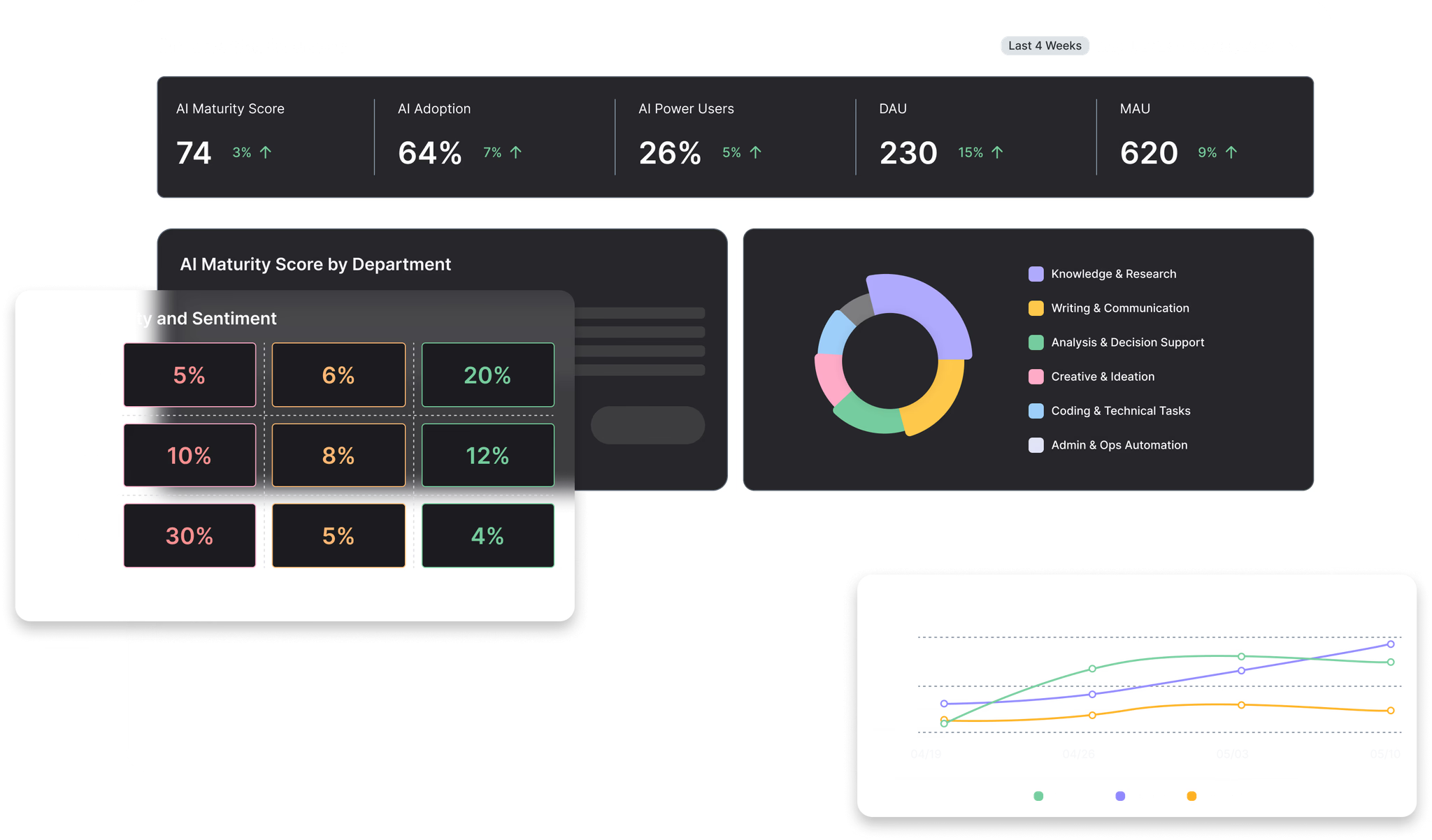
Measure AI Usage, Skills, and Impact

Real-time dashboards that track AI usage, skills, and ROI — with compliance controls built in.

xBFipmjurZyfcz0W1a7XE9NqpnI

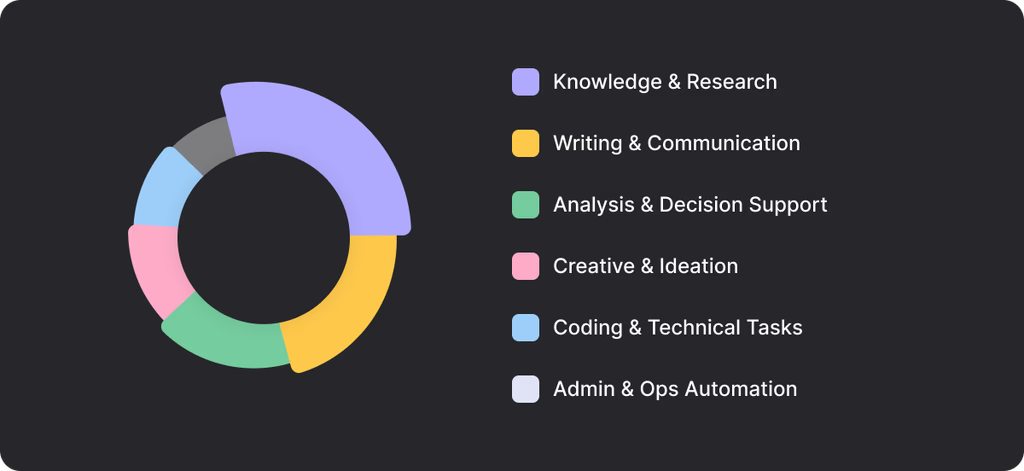
Discover how your teams use AI

Scout categorizes what people are doing with AI such as research, content creation, automating workflows, and more. This categorization shows where your AI initiatives are delivering results.
WFcg6DcMPDIUUr29yG5cy74H3S8

Discover every AI application in use

Find all AI tools—approved or not—and set or enforce data and usage policies for each.


AI ranking

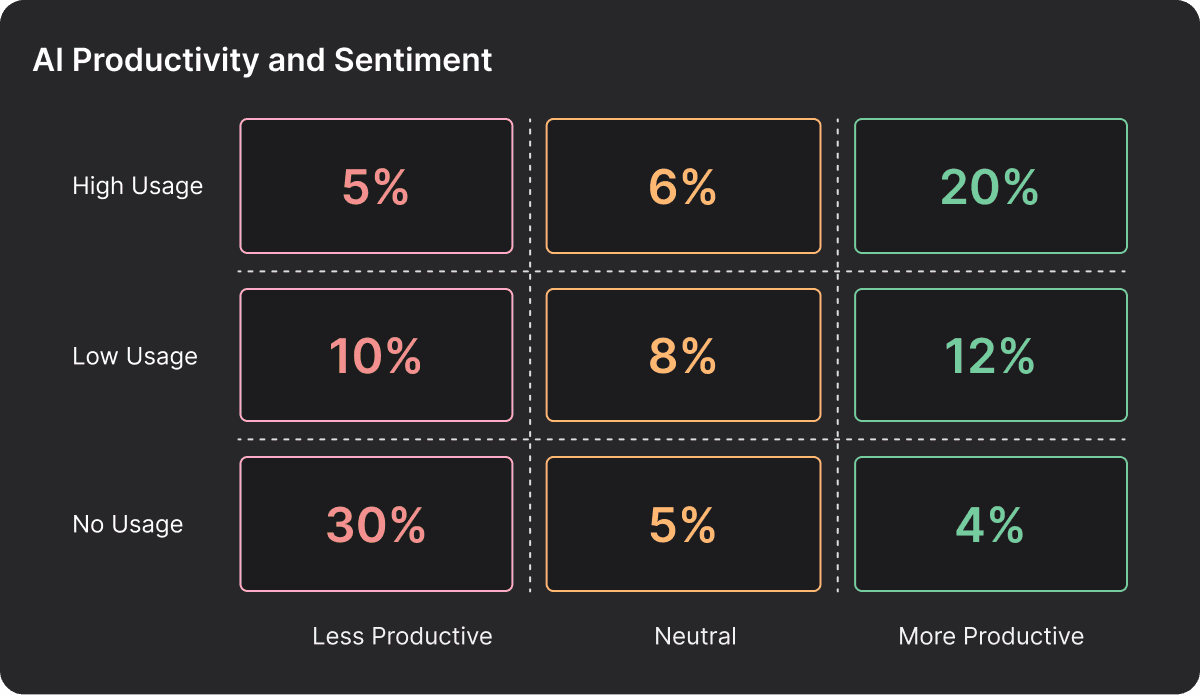
Focus on the most and least impactful AI usage

Map the intersection between usage and productivity (as reported by users) to identify which teams are leaning into AI successfully and which teams are struggling to target enablement and manage licensing investments.
Frame 2147235483

Compare time savings by team

Assess how AI adoption impacts team efficiency by combining passive usage detection with user surveys. Assess if teams are maximizing the value they can realize from the AI solutions available to them and provide enablement support where most effective.

Frame 2147235482

Control Personal vs. Enterprise AI Access

Automatically detect when users access personal AI accounts instead of approved enterprise licenses. Allow, warn, or block access in real time at the browser or desktop, enforcing data protection, compliance, and policy across every AI interaction.

Enterprise AI Governance Dashboard - Refactored for Website

Why CIOs Trust Scout

Scout is the only platform allowing our IT team to see the full landscape of AI usage, enforce governance, and have real ROI conversations with the board, driving our investment plan and focusing our efforts to spur adoption where it benefits us most.

Global Head of IT

Fortune 500 Company

Scout gave us complete visibility into our AI landscape beyond shadow AI usage and unauthorized tools, including adoption patterns and licensing trends that transformed our AI investment strategy into data-driven decision-making.

CIO

Fortune 1000 Company

About Scout

Lightweight Deployment

Scout works like endpoint security software - lightweight agents that see what's happening without disrupting your workflow or requiring vendor integrations.

Near Real-Time Visibility

Usage data refreshes every 15 minutes. Spot spending anomalies, policy violations, and adoption patterns as they happen—not weeks later.


Enterprise-Grade Security

SOC2 Type II certified with zero-knowledge architecture. We see usage patterns, never conversation content. SSO, RBAC, and data residency included.

FAQs

Scout

How does Scout work?

Scout is a non-obtrusive, centrally distributed browser plug-in that captures user activity on AI applications and the AI functions of AI integrated applications.

What does Scout track?

Larridin Scout is a browser-based measurement system that identifies interactions with hundreds of known AI applications. It captures metadata on which tools are being used, by which teams, and how frequently, giving you a comprehensive map of your company's AI landscape.

How can I measure AI Proficiency?

Larridin Scout measures it through three integrated signals: prompt quality; real-time value feedback; and utilization patterns.

How can I track compliance, governance, and risk vectors in AI usage?

Scout gives you complete visibility into every AI tool being used across your organization, who's using them, and usage patterns—the foundation for managing compliance, governance, and risk.

What are the right guardrails to report AI usage confidently to the board?

You need three things—complete visibility into what AI tools exist, data on how effectively they're being used, and evidence that governance policies are actually being followed.

How do I know which AI tools and models we should double down on?

Scout combines utilization data, proficiency signals, and real-time value feedback to show you which tools are actually driving business impact—not just which ones people are using.

Does Scout monitor private employee activity or read their data?

Absolutely not. Scout is designed with privacy as a core principle. It does not read or record keystrokes, emails, private messages, or information in documents. It only identifies the usage of known, public-facing AI websites to help you understand tool adoption and identify potential "Shadow AI" risks.

How can I find out what AI LLMs and applications are being used in my enterprise?

Deploy Scout across the enterprise and you will quickly have a categorized inventory of every AI LLM and application detected. Drill down to set policies or explore usage by team or location.

What kind of insights can we get from Scout?

Scout provides actionable intelligence to help you: - Discover all AI tools in use, including unapproved "Shadow AI." - Understand which departments and teams are the biggest adopters. - Optimize software spend by identifying redundant AI tool subscriptions. - Make data-informed decisions about your AI strategy and training needs.

How can I measure AI ROI?

You measure AI ROI by connecting three data points—utilization, proficiency, and value—to identify where AI investments are actually driving business impact.

How does AI maturity correlate with delivery speed and output quality?

Scout's data shows that AI maturity—measured by proficiency and effective tool usage—directly correlates with both speed and quality, but only when all three elements align: the right tools, skilled users, and high-value use cases.

How do I detect and manage the AI applications my employees buy personally and use at work (BYOAI)?

Scout discovers every AI tool being used across your organization in real-time—including personally purchased tools—and gives you the visibility to manage BYOAI risk before it becomes a compliance issue.

AI Exposure Report

How does the AI Exposure Report get data?

Authenticated users upload a SEIM.CSV file and Larridin will analyze it against the Larridin AI Catalog to create the AI Exposure Report. Larridin enforces Zero Data Storage. Every time you want a report, you will need to upload a new SEIM.CSV file.

Does Larridin save my data for the AI Exposure Report?

Larridin enforces zero data storage for the AI Exposure Report.