


A single LLM call is easy to price.
One prompt goes in. One response comes back. You get one cost.
A multi-agent workflow works differently.
An orchestrator may call several agents. One might retry after a failed tool call. Another might receive a much larger context than the first. By the time the task finishes, one business outcome may represent dozens of model calls.
A monthly token total won't tell you what happened.
To control multi-agent AI costs, you need to know which workflow ran, which agents consumed the tokens, where retries happened and what a successful result actually cost.
That's the level this guide focuses on.
Why agent workflows change the cost equation
Three things make multi-agent costs harder to understand.
Fan-out
- An orchestrator can dispatch work to several agents.
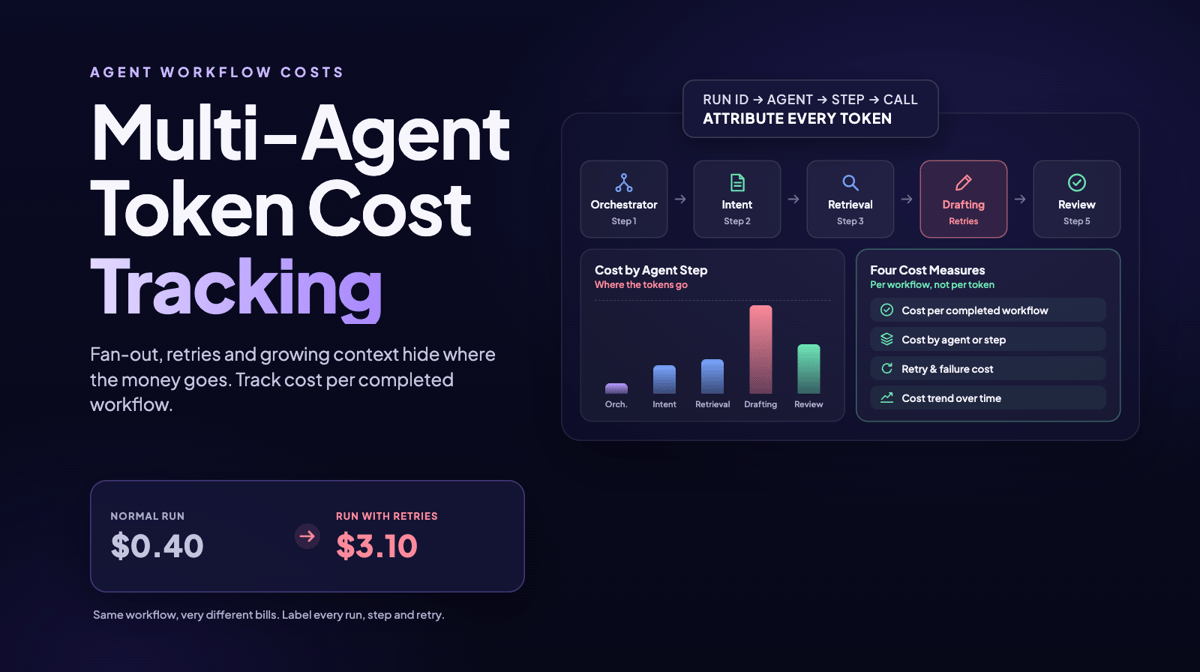
- A customer support workflow might use one agent to classify intent, another to retrieve information, another to draft the answer and another to review it.
- One ticket now creates several model calls.
Looking only at total token consumption hides which step generated the cost.
Retries and tool loops
- Agents can call tools, inspect the response and decide what to do next.
- A failed tool call, malformed response or validation error may trigger another model request.
- When that happens, part of the workflow gets paid for twice.
Repeated failures can turn reliability problems into cost problems.
Growing context
- Downstream agents may receive conversation history, retrieved documents, previous agent outputs or other workflow state.
- That can make later calls larger than earlier ones.
- The important metric isn't simply the number of calls. It's how much context each call carries and what useful work came out of it.
- Together, these effects make workflow costs variable.
- Two runs of the same workflow can consume different amounts even when they produce the same result.
That's why aggregate token totals aren't enough.
Measure the cost of the work, not just the model
Total tokens and total dollars still matter.
But four other measures tell you much more about whether an agent workflow is operating efficiently.
Cost per completed workflow
- How much does one successful outcome cost?
- If a support workflow normally costs $0.40 and one run costs $3.10, you want to know why.
Cost by agent or step
- Break the total into retrieval, drafting, review and other stages.
- That tells you which part of the workflow is driving the bill.
Retry and failure cost
- Separate normal execution from money spent repeating failed work.
- This turns a vague cost increase into an operational problem you can investigate.
Cost trend
- Watch cost per successful run over time.
- A new agent, longer prompt, different model or larger context can gradually increase costs without creating an obvious monthly spike.
- This is similar to the way cloud FinOps matured.
- A company doesn't just ask what AWS cost last month. It asks which application, customer or workload generated the cost.
- AI spend needs the same level of attribution.
Larridin's Spend & Token Intelligence applies that approach to AI activity. Instead of stopping at the total bill, it connects costs with agents, workflows and teams.
Instrument the workflow before analyzing the bill
You don't need to rebuild your agent stack to get useful cost visibility.
You do need consistent identifiers.
Step 1. Give every workflow run an ID
Create one identifier when the orchestrator starts the workflow.
Pass that ID through every downstream model and agent call.
Langfuse can use a trace for this. Helicone can group related requests into a session. You can also pass your own identifier through the orchestration layer.
Without a shared ID, you see individual calls but can't reliably tell which ones belong to the same piece of work.
Step 2. Identify every agent and step
Add an agent role and step identifier to each call.
For example:
Agent: retrieval
Step: 2
Now you can answer a much more useful question.
Which step costs the most?
Step 3. Capture cost at the individual call level
Record input tokens, output tokens, cached tokens when relevant and the dollar cost of each model call.
Langfuse can record usage and cost for individual generations and roll that data into traces.
Helicone tracks request-level cost and can group related requests into sessions.
That gives you the raw data required to calculate workflow costs.
Step 4. Label retries and failures
Don't let a retry look like another normal call.
Record whether the call was:
- A normal workflow step
- A retry
- A tool failure
- A validation failure
- A timeout
- Another exception
That allows you to calculate how much money went toward producing the result and how much went toward recovering from problems.
Step 5. Calculate cost per successful workflow
Once all calls share the same workflow ID, add up the cost of each successful run.
Now you have a useful unit of economics.
Cost per completed task.
A team handling customer support can measure cost per resolved ticket.
An engineering workflow can measure cost per completed review.
A finance agent can measure cost per processed invoice.
That makes the number easier for a budget owner to understand.
Step 6. Attribute the workflow to the business
Add the business dimensions you care about.
That might include:
- Team
- Department
- Product
- Feature
- Customer
- Environment
Now AI spend can be analyzed by the part of the company creating it instead of only by model provider.
Larridin's Spend & Token Intelligence is designed to roll this activity into workflow, agent and team views alongside broader AI usage data.
Attribute AI costs before the invoice arrives
Cost attribution usually breaks when identifiers disappear between systems.
An orchestrator might create a workflow ID but fail to pass it to a sub-agent.
Or three departments might share the same API key.
When that happens, the provider's bill may show the model and token count but not who created the cost.
Fix that upstream.
A dashboard can't reconstruct metadata that never existed.
Allocate AI spend by department
Department attribution uses the same approach as workflow attribution.
Attach the department to the run.
Then carry that tag through the agent calls.
Marketing's content workflow can now be separated from finance's reporting workflow even if they use the same model provider.
Shared API keys make this harder because provider billing views can't automatically determine which department created each request.
The solution is to identify the work before or during execution, not during next month's invoice review.
Several platforms address parts of this problem.
Ascerta focuses on GenAI economics and ROI. It connects AI costs with business KPIs and allows organizations to examine spending by use case, team, business unit and agent.
Its Provisioned Capacity product also tracks reserved AI capacity and helps attribute that capacity to agents and workloads.
Ascerta raised $4.9 million in seed funding in 2025.
Mavvrik approaches the problem from cost governance.
Its platform covers AI models, agents, GPU infrastructure, cloud services and other technology costs. It provides cost allocation, chargeback, forecasting, anomaly detection and budget controls.
It also supports allocation across teams, projects and customers.
Both are worth evaluating if detailed AI cost governance is your main requirement.
Larridin covers a broader measurement problem.
Spend & Token Intelligence sits alongside AI adoption, workflow and productivity measurement. That allows leaders to look at both what an AI workflow costs and what the organization gets from it.
That difference matters.
A dedicated cost platform may go deeper into infrastructure or capacity management.
A broader AI measurement platform becomes more useful when the question is whether the spend produced a measurable business outcome.
Set budgets where the cost changes
A monthly AI budget is useful for finance.
It's less useful for catching a runaway agent.
Set controls closer to the workflow.
Set a cost ceiling for individual workflows
A single unusually expensive run should be visible quickly instead of disappearing inside a monthly total.
Monitor retry rates
A rising retry rate can be an early sign that costs are about to move.
It also tells you why they're moving.
Watch cost per completed task
Compare this week with last week.
A slow increase may point to longer prompts, additional agents, larger context or a model change.
Use graduated thresholds
Helicone recommends alerts around 50%, 80% and 95% of a budget.
That gives teams time to investigate before the entire budget is consumed.
Alerts become much more useful when they're attached to workflow and ownership metadata.
“AI spend increased” doesn't tell anyone what to fix.
“The invoice-processing agent's retry cost doubled this week” does.
These operational signals connect with the broader questions CFOs ask about AI ROI and the visibility CIOs need across enterprise AI.
Tools for tracking token and agent costs
Several LLM observability platforms can provide the underlying cost data.
Langfuse
- Langfuse tracks usage and cost for LLM generations.
- It records cost by usage type, including input, output and cached tokens when the provider supplies them.
- Costs can come directly from the model provider or be calculated from Langfuse's pricing definitions.
- Its traces, sessions and agent graphs let teams connect individual model calls with the larger workflow.
- Custom dashboards and alerts can then surface cost by model, tag, user or other dimensions.
Helicone
- Helicone also provides request-level cost tracking.
- Sessions group related requests so teams can see the cost of a complete workflow instead of one model call.
- Custom properties let you break cost down by dimensions such as environment, feature or customer.
- Helicone also supports caching, cost alerts and reporting.
- Its documentation specifically recommends graduated budget thresholds at 50%, 80% and 95%.
- For teams starting with agent observability, Langfuse or Helicone can provide much of the instrumentation needed to understand what's happening inside a workflow.
- The next question is how far you need to roll that information up.
- Engineering may be comfortable analyzing individual traces.
- Finance usually wants workflow, team and business-unit costs without writing an aggregation query.
- That's where a broader spend measurement layer becomes useful.
Avoid the mistakes that make agent costs hard to explain
Tracking spend only by model
- One workflow might use three models while another uses one.
- Model spend doesn't tell you which business process created the bill.
Ignoring retries
- A failed tool call still consumes resources.
- Tag retries so you know what reliability problems are costing.
Waiting for the monthly bill
- By then the expensive workflow may have run thousands of times.
- Track cost while the workflow is operating.
Sharing API keys without metadata
- A shared key can simplify access but makes attribution harder.
- Carry team, workflow or application metadata separately.
Giving the whole AI program one budget
- That hides individual workflows.
- Set program-level budgets for finance and workflow-level controls for operations.
Measure where the cost actually happens
Multi-agent workflows didn't change the price of tokens.
They changed the unit of work.
One useful outcome may now require several agents, model calls, tool calls and retries.
Your measurement needs to follow the same chain.
- Start with a workflow ID.
- Track cost by agent and step.
- Separate successful work from retries.
- Then calculate cost per completed task and attribute it to the team, product or customer responsible for it.
Whether you use Langfuse or Helicone for agent-level observability, Ascerta or Mavvrik for AI cost management, or Larridin for spend measurement alongside broader AI usage and outcomes, the same rule applies.
Know what generated the cost before the invoice arrives.
Want to connect token spend with the agents, workflows and teams creating it? See Larridin's AI measurement platform.